
Showing posts with label Mobile Zone / Free Browsing Tricks. Show all posts
Showing posts with label Mobile Zone / Free Browsing Tricks. Show all posts
For symbian users, first download simple server Here
Goto settings, then Create new access point on your device With The following Details:-
Apn:- etisalat
IP:- 127.0.0.1
Port:- 8080
Then open the app and follow the below settings:
Access Point :
- Default
Local Host :
- 127.0.0.1
Local Port :
- 8080
- Default
Local Host :
- 127.0.0.1
Local Port :
- 8080
Click on HTTP Query :
- Front Query : None
- Middle Query : None
- Back Query : None
- Reverse Query : None
- Inject Query : rbt.etisalat.com.ng/
- Inject Method : GET
- Inject Newline : \n
- Inject Splitline : Default
- Front Query : None
- Middle Query : None
- Back Query : None
- Reverse Query : None
- Inject Query : rbt.etisalat.com.ng/
- Inject Method : GET
- Inject Newline : \n
- Inject Splitline : Default
Click on HTTP Header :
- Custom Header 1 : Http
- Header Value 1 : z022.fma.fb.me
- Custom Header 2 : Host
- Header Value 2 : s.youtube.com
- Custom Header 3 : None
- Header Value 3 : None
- Custom Header 4 : None
- Header Value 4 : None
- Custom Header 1 : Http
- Header Value 1 : z022.fma.fb.me
- Custom Header 2 : Host
- Header Value 2 : s.youtube.com
- Custom Header 3 : None
- Header Value 3 : None
- Custom Header 4 : None
- Header Value 4 : None
Click on Server Config :
- Fetch Server : None
- Keep Server : None
- Url Replacer : None
- Advanced Mode : Yes
- Tunnel Proxy : No
- HTTPS Connection : Yes
- Server Buffer : 1021
- Screen Size : Normal
Proxy Host :
- 10.71.170.5
Proxy Port :
- 8080
- Fetch Server : None
- Keep Server : None
- Url Replacer : None
- Advanced Mode : Yes
- Tunnel Proxy : No
- HTTPS Connection : Yes
- Server Buffer : 1021
- Screen Size : Normal
Proxy Host :
- 10.71.170.5
Proxy Port :
- 8080
Leave Exit then Open it again and minimize::::::::::::::::
Now goto ur Ucweb, Opera Den Connect with d access point u created In the first Place:::::::::::::::::::
Note: This tweak works faster on ucweb browser(non-handler)
For pc users, download the zip file here.
All process is stated in the zip file.
Password: www.guruswizard.com
Feel free to share/like this post and am here to give you quick response when you faced any difficult during the configuration.
If you enjoyed this article, Join over 3500 subscribers who get email updates (It’s Free) Sign Up Now!
Wow!!! I really thank God for the author of this trick...
Can't really imagine myself making free calls to calls on my airtel sim.
The interesting part of this trick is that you can get to call all network for free without airtel network reducing a dime from your device.
Just wish that this tweak lasts for months.

To cut the story short, Just get an airtel sim, whether old or new sim, then dial 987.
Once the number is being dialed, you would hear there bot speaking some unknown grammers (for the dummies i mean) that is not easily understood, just ignore and quickly press either 3 or 4 on your device, then wait till that bot tells you to enter the number, then quickly enter the number you wish to contact.
Yipee, your call would be connected, you can then speak to the individual till you are tired of speaking.
If you wish to contact any other person, then just follow same procedure as explained above.
This trick is so easy to grab, such that the dumest person on earth would understand the process.
Can't really imagine myself making free calls to calls on my airtel sim.
The interesting part of this trick is that you can get to call all network for free without airtel network reducing a dime from your device.
Just wish that this tweak lasts for months.
To cut the story short, Just get an airtel sim, whether old or new sim, then dial 987.
Once the number is being dialed, you would hear there bot speaking some unknown grammers (for the dummies i mean) that is not easily understood, just ignore and quickly press either 3 or 4 on your device, then wait till that bot tells you to enter the number, then quickly enter the number you wish to contact.
Yipee, your call would be connected, you can then speak to the individual till you are tired of speaking.
If you wish to contact any other person, then just follow same procedure as explained above.
This trick is so easy to grab, such that the dumest person on earth would understand the process.
Etisalat is now surfing fast on all mobile device which includes (java, symbian(tested) and androids(Not sure)).
For over 2months now, i have been recieving mails from mostly java users for opera tweak..
Well here is the tweak below, Just follow the process carefully and don't even make a mistake or give a gap between those ip's and port's that would be listed below.

First download an opera4.2 labs handler or 5.2, 4.5, 6, 7 handlers from sharemobile.ro or nextwap.net,
Then make a manual configuration on your device:-
Ip:- buy.etisalat.com.ng or 41.223.145.141
Port:- 80
Apn:- etisalat
Note:- Java users, you would be needing to creat a professional settings.
Then in your opera handlers, set the settings below:-
On http server:
http://buy.etisalat.com.ng:80/
On socket server:
socket://82.145.211.1:80
Then select Host on proxy server and input:
mobile.etisalat.com.ng2fa.3fa.server4.operamini.com
For opera 4.5, 6 or 7 handlers, set the following:
Front query: buy.etisalat.com.ng#
Real Host: mobile.etisalat.com.ng2fa.3fa.server4.operamini.com
Note:- Try to change your opera protocol to Socket if it didn't work fast on http... If you didn't get the tweak, or having problem with the tweak, then specify your phone model before making complains....
Flex this tweak while it lasts...
For over 2months now, i have been recieving mails from mostly java users for opera tweak..
Well here is the tweak below, Just follow the process carefully and don't even make a mistake or give a gap between those ip's and port's that would be listed below.
First download an opera4.2 labs handler or 5.2, 4.5, 6, 7 handlers from sharemobile.ro or nextwap.net,
Then make a manual configuration on your device:-
Ip:- buy.etisalat.com.ng or 41.223.145.141
Port:- 80
Apn:- etisalat
Note:- Java users, you would be needing to creat a professional settings.
Then in your opera handlers, set the settings below:-
On http server:
http://buy.etisalat.com.ng:80/
On socket server:
socket://82.145.211.1:80
Then select Host on proxy server and input:
mobile.etisalat.com.ng2fa.3fa.server4.operamini.com
For opera 4.5, 6 or 7 handlers, set the following:
Front query: buy.etisalat.com.ng#
Real Host: mobile.etisalat.com.ng2fa.3fa.server4.operamini.com
Note:- Try to change your opera protocol to Socket if it didn't work fast on http... If you didn't get the tweak, or having problem with the tweak, then specify your phone model before making complains....
Flex this tweak while it lasts...
This tweak goes out to all symbian users. For now symbian users would be blazing this tweak, more loading....
The last jwp tweak i posted durning the xmas period was being blocked, now here is another.

To cut the story short.
First download Jwp mobile Here
And download ultimate python Here for the app to work for you.
Create settings:
Configuration name: Jwp
APN: etisalat
IP: 127.0.0.1
Port: 8080
Then follow the below procedure:
Install and open the app
=>Protocol: HTTP
=>http port: 8080
=>J.W.P user: guruswizard
=>J.w.P pass: guruswizard
=>J.W.P server: http://mobile.jwp.joshsoft.com
=>Isp proxy: 41.223.145.141
=>I.S.P port: 80
Leave other field empty
Tweak: select ETISALAT NG
Then save.
Enter options then connect.
It would display similar stuff like:
>>Authencating.....
>>Authencation in progress
>>Done
>>Account status: *** *** *** ***
>>Connection date: ***-***-**
>>listening to 127.0.0.1:8080
Then you are good to go, just minimize the app, and move to and defauld browser and start flexing..
If you have any problem, Let us know....
Flex this tweak while it lasts, it also works in the north...
All thanks to the author of the software. Mr Adebayo
Happy Sunday...
The last jwp tweak i posted durning the xmas period was being blocked, now here is another.
To cut the story short.
First download Jwp mobile Here
And download ultimate python Here for the app to work for you.
Create settings:
Configuration name: Jwp
APN: etisalat
IP: 127.0.0.1
Port: 8080
Then follow the below procedure:
Install and open the app
=>Protocol: HTTP
=>http port: 8080
=>J.W.P user: guruswizard
=>J.w.P pass: guruswizard
=>J.W.P server: http://mobile.jwp.joshsoft.com
=>Isp proxy: 41.223.145.141
=>I.S.P port: 80
Leave other field empty
Tweak: select ETISALAT NG
Then save.
Enter options then connect.
It would display similar stuff like:
>>Authencating.....
>>Authencation in progress
>>Done
>>Account status: *** *** *** ***
>>Connection date: ***-***-**
>>listening to 127.0.0.1:8080
Then you are good to go, just minimize the app, and move to and defauld browser and start flexing..
If you have any problem, Let us know....
Flex this tweak while it lasts, it also works in the north...
All thanks to the author of the software. Mr Adebayo
Happy Sunday...
Hurray!!! Its heating, its boiling and now its blazing.. Wow!! Here comes the bombardment of the latest mtn magic sim particle. Lol.. Seems like am speaking in chemistry terms. But do you know that the chemistry behinde every magic sim tweak is wisdom and luck. It your lucky, yours would be activated. To get started with this tweak, first get a Mtn sim card which is on any plan. Then Load a sum of #250 on it, nothing less, nothing much and Set Your Time To 0:00 And Date 12/12/2015. (Nokia tourchlight recommended)

For the past months this tweak was published to the view of only my subscribed blog readers.
It's a pity if you havn't been flexing yours, well to subscribe for our updates both hidden and publised is free. Kindly click here to subscribe.
This tweak goes to all glo users. (of course i know everyone would become a glo user..Lol)
FEATURES:
*.It browses at the speed 7.2mb/s.
*.It works on all device except a blackberry phone.
*.It opens all kinds of application both on PC and Mobile.
*.It’s for life….Once configured, you can use till you loose your sim.
*.It cost you only #1000 naira only to configure the glo magic sim
 Requirements:
1. Two glo sim cards
2. A computer and modem in it, or you can fix the sim card on another device if you don't have a computer.
To get started with this easy tweak, first put your main glo line(the line you want to use to surf the tweak) in your modem or you can fix the sim card on another device if you don't have a computer.
As for the other glo line, just recharge a one thousand naira recharge card and subscribe for a package by dialing *127*53# or by sending an sms, 53 to 127.
Once this process is concluded, don't browse with it, or instead off your data or better make use of a touchlight nokia.
Now this final process is the sweetest.
With the sim on your phone in which you used for the subscription, simply dial this code on it, *127*01*the number on your modem/
device.
Then you would recieve a message on your modem/device.
Then your on, browse for like 2-3mins then dial *127*02*number on your modem/device.
You can then flex with the other sim you shared the data with.
 Note:- You can still use the same sim you recharged the one thousand naira on, to share the subscribed data with as many glo sim you have without re-subscribing. Just share it by dialing the same *127*01*TH GLO LINES NUMBER YOU WANT TO SHARE WITH#
Flex this tweak. Its not capped, it Unlimited.
Glo Unlimited, 'as their provider said(Lol)
If you encounter any problem, then let us know...
It's a pity if you havn't been flexing yours, well to subscribe for our updates both hidden and publised is free. Kindly click here to subscribe.
This tweak goes to all glo users. (of course i know everyone would become a glo user..Lol)
FEATURES:
*.It browses at the speed 7.2mb/s.
*.It works on all device except a blackberry phone.
*.It opens all kinds of application both on PC and Mobile.
*.It’s for life….Once configured, you can use till you loose your sim.
*.It cost you only #1000 naira only to configure the glo magic sim
1. Two glo sim cards
2. A computer and modem in it, or you can fix the sim card on another device if you don't have a computer.
To get started with this easy tweak, first put your main glo line(the line you want to use to surf the tweak) in your modem or you can fix the sim card on another device if you don't have a computer.
As for the other glo line, just recharge a one thousand naira recharge card and subscribe for a package by dialing *127*53# or by sending an sms, 53 to 127.
Once this process is concluded, don't browse with it, or instead off your data or better make use of a touchlight nokia.
Now this final process is the sweetest.
With the sim on your phone in which you used for the subscription, simply dial this code on it, *127*01*the number on your modem/
device.
Then you would recieve a message on your modem/device.
Then your on, browse for like 2-3mins then dial *127*02*number on your modem/device.
You can then flex with the other sim you shared the data with.
Flex this tweak. Its not capped, it Unlimited.
Glo Unlimited, 'as their provider said(Lol)
If you encounter any problem, then let us know...
Android and Pc users, this tweak goes to you.
All thanks to owner of the your-freedom vpn software.
This tweak works perfectly and also rocks faster to those who their 3GB is looking at them with the use of Android or PC device.

Just follow the below procedure:
First download your-freedom app Here
Then input the below settings:
Server Connection>> your freedom server:>
ems03.your-freedom.de)
Connection mode:> DNS
port:> 53
Tweaks:> Nigeria etisalat.
Now move back to
proxy settings>> proxy address:> 0.facebook.com
Save connection and start flexing....
For Pc users:
==>Open an account Here
==> Download the latest Your-free Here
==>Install and run as administrator.
==>Goto configure + server connection = ems18.your-freedom.de
==>enterport 53.
Connection mode=DNS.
Tweak Nigeria Etisalat.
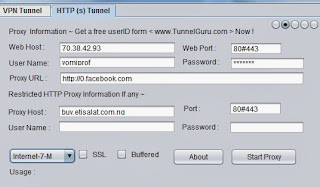
Then mark 3,5,7,9.
Then minimum buffer size=1500.
Reconnection delay=5000,
initial post size=10000000,
minimum= 20000,
ftp mode= both,
ssl protocol= Any.
==>input your username and password you used in registering in the account information area save and exit.
==>Then goto the Ports and untick Web
Port= 6050 or 6052 and tick back that's all.
==>Configure your browser like this
Proxy: 127.0.0.1 and Port 6050 or 6052 depending on the one you used on Your Freedom
APN: etisalat
Proxy address: 0.facebook.com
Save and hit the connect button.
This tweaks blaze with the fullest speed on premium account
Hope this Helps. Feel free to lay-down any problem.
More tweaks loading for android and Pc......
Java loading..... fully on point.........
All thanks to owner of the your-freedom vpn software.
This tweak works perfectly and also rocks faster to those who their 3GB is looking at them with the use of Android or PC device.
Just follow the below procedure:
First download your-freedom app Here
Then input the below settings:
Server Connection>> your freedom server:>
ems03.your-freedom.de)
Connection mode:> DNS
port:> 53
Tweaks:> Nigeria etisalat.
Now move back to
proxy settings>> proxy address:> 0.facebook.com
Save connection and start flexing....
For Pc users:
==>Open an account Here
==> Download the latest Your-free Here
==>Install and run as administrator.
==>Goto configure + server connection = ems18.your-freedom.de
==>enterport 53.
Connection mode=DNS.
Tweak Nigeria Etisalat.
Then mark 3,5,7,9.
Then minimum buffer size=1500.
Reconnection delay=5000,
initial post size=10000000,
minimum= 20000,
ftp mode= both,
ssl protocol= Any.
==>input your username and password you used in registering in the account information area save and exit.
==>Then goto the Ports and untick Web
Port= 6050 or 6052 and tick back that's all.
==>Configure your browser like this
Proxy: 127.0.0.1 and Port 6050 or 6052 depending on the one you used on Your Freedom
APN: etisalat
Proxy address: 0.facebook.com
Save and hit the connect button.
This tweaks blaze with the fullest speed on premium account
Hope this Helps. Feel free to lay-down any problem.
More tweaks loading for android and Pc......
Java loading..... fully on point.........
This xmas tweak goes out to all symbian users. For now symbian users would be blazing this tweak, Java, android and pc users loading....
For over a week now, i have been recieving mail from most of my blog readers concerning my promise on dishing out tweak this festive period, well, now i am back for that, all things have there time.
To cut the story short.
First download Jwp mobile Here
Create settings:
Configuration name: Jwp
APN: etisalat
IP: 127.0.0.1
Port: 8080
Then follow the below procedure:
Install and open the app
=>Protocol: HTTP
=>http port: 8080
=>J.W.P user: guruswizard
=>J.w.P pass: guruswizard
=>J.W.P server: http://mobile.jwp.joshsoft.com
=>Isp proxy: z012.fma.fb.me
=>I.S.P port: 8081
Leave other field empty
Tweak: select ETISALAT NG
Then save.
Enter options then connect.
It would display similar stuff like:
>>Authencating.....
>>Authencation in progress
>>Done
>>Account status: *** *** *** ***
>>Connection date: ***-***-**
>>listening to 127.0.0.1:8080
Then you are good to go, just minimize the app, and move to and defauld browser and start flexing..
If you have any problem, Let us know.
For over a week now, i have been recieving mail from most of my blog readers concerning my promise on dishing out tweak this festive period, well, now i am back for that, all things have there time.
To cut the story short.
First download Jwp mobile Here
Create settings:
Configuration name: Jwp
APN: etisalat
IP: 127.0.0.1
Port: 8080
Then follow the below procedure:
Install and open the app
=>Protocol: HTTP
=>http port: 8080
=>J.W.P user: guruswizard
=>J.w.P pass: guruswizard
=>J.W.P server: http://mobile.jwp.joshsoft.com
=>Isp proxy: z012.fma.fb.me
=>I.S.P port: 8081
Leave other field empty
Tweak: select ETISALAT NG
Then save.
Enter options then connect.
It would display similar stuff like:
>>Authencating.....
>>Authencation in progress
>>Done
>>Account status: *** *** *** ***
>>Connection date: ***-***-**
>>listening to 127.0.0.1:8080
Then you are good to go, just minimize the app, and move to and defauld browser and start flexing..
If you have any problem, Let us know.
As i have promised, we are trying our best to find more easier solutions to this 3GB not connecting issue.
This method seems similar to the previous method but its much more eaiser and faster than the previous method.
A freind of my that lives close to me brought a similar issue to me yesterday and we all got it resolved with this method.

=> First get/borrow a blackberry device.
=> Then insert your etisalat 3GB sim in the BB device.
You would notice that once you try to ping with it, it won't connect.
=> Just call the customer service by dialing 200 and explain to them that you have subscribed for a month plan on your blackberry device but it's not connecting. They would help you fix that up for a moment.
=> Once it's fixed up, then try to use the sim to ping, if the ping connects then you are good to go.
=> Don't be in a hurry, simply use that same BB- device to subscribe for BB10 daily plan in which you would be given 15MB.
=> Once you are through, then remove your etisalat sim and swap to any Non-bb device(android, java, symbian, Pc, iphones e.t.c.) and start flexing.
With full confidence, i advice those that just want to subscribe or re-subscribe to move ahead.
Hope this helps.
Seems like this is the best of all our solutions.
This method seems similar to the previous method but its much more eaiser and faster than the previous method.
A freind of my that lives close to me brought a similar issue to me yesterday and we all got it resolved with this method.
=> First get/borrow a blackberry device.
=> Then insert your etisalat 3GB sim in the BB device.
You would notice that once you try to ping with it, it won't connect.
=> Just call the customer service by dialing 200 and explain to them that you have subscribed for a month plan on your blackberry device but it's not connecting. They would help you fix that up for a moment.
=> Once it's fixed up, then try to use the sim to ping, if the ping connects then you are good to go.
=> Don't be in a hurry, simply use that same BB- device to subscribe for BB10 daily plan in which you would be given 15MB.
=> Once you are through, then remove your etisalat sim and swap to any Non-bb device(android, java, symbian, Pc, iphones e.t.c.) and start flexing.
With full confidence, i advice those that just want to subscribe or re-subscribe to move ahead.
Hope this helps.
Seems like this is the best of all our solutions.
Get Etisalat 100mb on your tecno anndroid device.
Follow the below procedure:-
-Insert an Etisalat sim on your tecno android device
-Then send HIGH to 8186.
These promo works on most tecno android devices,
Tested and comfirmed on Tecno Q1, P3 and pad, but you can still try for other tecno android device.

Here are also the list of the valid command that could be sent:
Send any of the above to same 8186
Note:- This promo can be done only once on your tecno device.
Hope this helps!!!
Follow the below procedure:-
-Insert an Etisalat sim on your tecno android device
-Then send HIGH to 8186.
These promo works on most tecno android devices,
Tested and comfirmed on Tecno Q1, P3 and pad, but you can still try for other tecno android device.

Here are also the list of the valid command that could be sent:
- Young,
- help,
- zoom
- , mega,
- p6,
- solo1,
- solo2,
- gtabs,
- am,
- y210,
- note3,
- s3
- , help,
- tab2,
- note2,
- camera,
- winsmart,
- win, tab,
- high,
- mid
- , low,
- note8,
- s4.
Send any of the above to same 8186
Note:- This promo can be done only once on your tecno device.
Hope this helps!!!
Hmmm. Etisalat agencies seems to be working on blocking this tweak, but the funny thing is that they don't know that there are many pot holes on there server.
If you still have your 3GB with you and you don't want to re-fund your 1K, here is another method to make use of it.
As i promised you guys, we are still working hard for solutions, and i can see solutions coming closer.
Hehehe... Seems like etisalat have forgotten there authorized package.
After explaining the method on how to activate your 3GB back, i would then give you a Link Prove which authorizes this method.
Recommended:- Etisalat Bis rocking on Non-BB device
Just take a review through this steps
-Get a new sim that is not activated yet and must be a data sim.
Etisalat’s Multi Device plan basically lets you make up to four clones of your primary SIM with new, previously unregistered.
-Dial *215*PIN*1*newNumber*newPUK# for SIM 1 (i.e.) Dial *215*0000*1*0809XXXXXXX*12345678# or SMS “Add newNumber,1, PIN,newPUK” to 215 for SIM 1 i.e “Add 0809XXXXXXX,1,0000,12345678″ to ’215′ (where 1 indicates the first SIM being added, subsequent SIMs would be 2, 3 and 4 respectively, PIN refers to a 4-digit PIN you choose, and PUK is the Personal Unblocking Key of the SIM you are adding). If successful, you would be able to access the data on your primary SIM from the new registered secondary SIM.
-After registering, it is advisable to change your PIN, you can do so by dialling *215*oldPIN*newPIN#
.
-To check if a new SIM has been successfully added, you can dial *215# which shows the number of SIMs that have been successfully added. You can also insert a secondary SIM and dial *248# to check the number of the SIM. It should show the same number as your primary SIM.
-To check which of the SIMs is primary, dial *215*2# or Send “2″ to 215.
-To remove a secondary SIM, Dial *215*PIN*1*0# or Send del, 1, 0 to 215 (for SIM 1)
.
-To opt out of the multi device plan, Dial *215*PIN# or Send Out PIN to 215.
To see for yourself that this method is approved by network provider, kindly check in this link =>http://www.etisalat.com.ng/easyblaze/multidevice.php.
Hope this helps. More contents Loading... Let me take a break.
If you still have your 3GB with you and you don't want to re-fund your 1K, here is another method to make use of it.
As i promised you guys, we are still working hard for solutions, and i can see solutions coming closer.
Hehehe... Seems like etisalat have forgotten there authorized package.
After explaining the method on how to activate your 3GB back, i would then give you a Link Prove which authorizes this method.
Recommended:- Etisalat Bis rocking on Non-BB device
Just take a review through this steps
-Get a new sim that is not activated yet and must be a data sim.
Etisalat’s Multi Device plan basically lets you make up to four clones of your primary SIM with new, previously unregistered.
-Dial *215*PIN*1*newNumber*newPUK# for SIM 1 (i.e.) Dial *215*0000*1*0809XXXXXXX*12345678# or SMS “Add newNumber,1, PIN,newPUK” to 215 for SIM 1 i.e “Add 0809XXXXXXX,1,0000,12345678″ to ’215′ (where 1 indicates the first SIM being added, subsequent SIMs would be 2, 3 and 4 respectively, PIN refers to a 4-digit PIN you choose, and PUK is the Personal Unblocking Key of the SIM you are adding). If successful, you would be able to access the data on your primary SIM from the new registered secondary SIM.
-After registering, it is advisable to change your PIN, you can do so by dialling *215*oldPIN*newPIN#
.
-To check if a new SIM has been successfully added, you can dial *215# which shows the number of SIMs that have been successfully added. You can also insert a secondary SIM and dial *248# to check the number of the SIM. It should show the same number as your primary SIM.
-To check which of the SIMs is primary, dial *215*2# or Send “2″ to 215.
-To remove a secondary SIM, Dial *215*PIN*1*0# or Send del, 1, 0 to 215 (for SIM 1)
.
-To opt out of the multi device plan, Dial *215*PIN# or Send Out PIN to 215.
To see for yourself that this method is approved by network provider, kindly check in this link =>http://www.etisalat.com.ng/easyblaze/multidevice.php.
Hope this helps. More contents Loading... Let me take a break.
The etisalat bis is now known to most individuals, that is the reason why etisalat network has gone as far as tracking down android devices used for the subscribtion easily.
Whats my point?
The reason why some individuals that did subscribed for the etisalat bis with there android device, causing the Bis not to work is because Etisalat service tracked down there device, then instead of getting the normal 3Gb they would get 250Mb because there data plan was converted, Or even some had there own 3Gb but couldn't work on there android device, few others, there network icon was being changed.
So my advice to all those that had any of these problems should try and reach the customers service by dialing 200 and request for opt-out of the BB10 daily then when that is being resolved, call back and request for re-fund complaining that you mistakened another package with the etisalat bis.
After you have done all that, find a BB device to make your etisalat bis subscribtion and swap your sim back to your device.
Am still flexing mine on both symbian and PC.(Lol)
Hope this would help.
We are truly sorry for any incoviences caused. But one have to take a risk in every success.
Just note that we are still working hard for a solution to this mess.
Whats my point?
The reason why some individuals that did subscribed for the etisalat bis with there android device, causing the Bis not to work is because Etisalat service tracked down there device, then instead of getting the normal 3Gb they would get 250Mb because there data plan was converted, Or even some had there own 3Gb but couldn't work on there android device, few others, there network icon was being changed.
So my advice to all those that had any of these problems should try and reach the customers service by dialing 200 and request for opt-out of the BB10 daily then when that is being resolved, call back and request for re-fund complaining that you mistakened another package with the etisalat bis.
After you have done all that, find a BB device to make your etisalat bis subscribtion and swap your sim back to your device.
Am still flexing mine on both symbian and PC.(Lol)
Hope this would help.
We are truly sorry for any incoviences caused. But one have to take a risk in every success.
Just note that we are still working hard for a solution to this mess.
Subscribe to:
Posts
(
Atom
)