
Showing posts with label Tips and Trick. Show all posts
Showing posts with label Tips and Trick. Show all posts
This week, the world was shocked with the release private photos
celebrity Holywood and character on the internet. Nganjuk names such as
Jennifer Lawrence (The Hunger Games movie), Selena Gomez, and Hope Solo
(Princess pesepakpola) associated with the dissemination of the photos
should be the private collection.

The photos that reportedly totaled hundreds of the most of cloud computing services dihack iCloud belongs to Apple that is also used in the iPhone and iPad. Apple has to oppose by stating that the incident was not caused by the imperfections of their system but because hackers who are trying to steal the password property of the iCloud celebrities.
Nevertheless, this incident seemed to arouse the society about the need to preserve personal files.
Many ways to protect files that are uploaded to cloud computing. Such as improved security by using a two level password security questions, designing specific to not connect to cloud computing by automatically.
Although the last is the simplest way, but in fact a lot of people who have yet to figure it out. Whereas in this way, your photo is very safe because it is only within the device without uploaded on the internet.
iOS: iPhone And iPad
Iphone speculation the major cause of caladium regarding the pictures of celebrities on the internet many addressed on the services backups icloud belonging to apple that is in an iphone and the ipad.This service enables you to access all the files that is in a device that lets you do with accounts of login icloud.
To disable the function synchronize photos in iCloud, easy enough to do. First, go to the settings menu "2013 iCloud "2013 Photos. That does not automatically upload in iCloud, you just need to organize Photos into position off.

Facebook On Android
By default, you do not need to do settings in Android because at the beginning of usage, usually the file sync feature on Android are in position off. But to simply know and guard can right? To disable the sync feature in Facebook applications, you need to perform the following steps:
The photos that reportedly totaled hundreds of the most of cloud computing services dihack iCloud belongs to Apple that is also used in the iPhone and iPad. Apple has to oppose by stating that the incident was not caused by the imperfections of their system but because hackers who are trying to steal the password property of the iCloud celebrities.
Nevertheless, this incident seemed to arouse the society about the need to preserve personal files.
Many ways to protect files that are uploaded to cloud computing. Such as improved security by using a two level password security questions, designing specific to not connect to cloud computing by automatically.
Although the last is the simplest way, but in fact a lot of people who have yet to figure it out. Whereas in this way, your photo is very safe because it is only within the device without uploaded on the internet.
iOS: iPhone And iPad
Iphone speculation the major cause of caladium regarding the pictures of celebrities on the internet many addressed on the services backups icloud belonging to apple that is in an iphone and the ipad.This service enables you to access all the files that is in a device that lets you do with accounts of login icloud.
To disable the function synchronize photos in iCloud, easy enough to do. First, go to the settings menu "2013 iCloud "2013 Photos. That does not automatically upload in iCloud, you just need to organize Photos into position off.
Facebook On Android
By default, you do not need to do settings in Android because at the beginning of usage, usually the file sync feature on Android are in position off. But to simply know and guard can right? To disable the sync feature in Facebook applications, you need to perform the following steps:
- Open aplication Facebook for Android
- Click the settings menu in the top right
- After the open, locate the menu Photos
- After the menu Photos open, you will see the button Sync Photos. Don't push the button if you do not want the existing photo in the smartphone directly uploaded on facebook
Release applications that have infiltrated the malware in Play make
users often Store Android devices misgivings when it installs a new
application. Various ways to prevent the entry of dangerous malware to
mobile phones. Installing antivirus guarantee your device is free from
such threats.

For that you should be aware of what permissions the app is required by an application before installing it. See a full explanation about the App Permissions in the following brief:
what is the App Permissions?
1. any Android application requires authorization from the user before performing a series of actions such as SD card content or access the contact list.
2. with the authorization of such obligations, then before installing the application the user will be notified about any activity that would be taken by the application in question.
4. by recognizing the app permissions before you install an application, users can avoid installing an application which can deplete a pulse or even divulge your personal data.
5. When you will install the application from a Play Store, you can view the app permissions as shown below:
of the users generally do not pay attention to the permissions the app will install an application or game. Well to see the app permissions that exist in the application already installed, the user can go to the settings-& gt; apps one by one and choose the associated application. Here is a sample app permissions you need to beware of:
6. Full network access With permit applications to access internet network, then you give your trust in that application to use the internet You line. In normal situations, the application will use it to deliver ads or acquire the needed information from the internet. However, such permission may be exploited by malware to divulge personal data when combined with permission to edit or delete content on USB storage.
7. Modify or delete the contents of your USB storage by having the discretion to modify or remove any content, applications and games that you can freely install USB storage access to make changes that include storage or deletion of data. When you are done playing games, all data relating to your play activity will be automatically stored to be used later as you continue playing the game. However, in an application that has infiltrated the authorization, malware can be used to upload content in the USB storage to the internet.
8. Directly call phone numbers If you install an alternative dialer application, then the application will automatically have the same ability to make calls. Third-party sms applications have also generally been provided with the same ability to directly dial a contact that comes from all the incoming sms messages. The permissions granted at the same time can also be exploited by malware to spy on your talks with calls discreetly to a certain number and illegally recording the talks.
9. Send SMS or MMS messages when you install third-party sms apps, of course it will ask for permission to send messages on your behalf. Likewise when you install an application of social media that require login or verification through sms. But if you find an application requesting permission to send messages even though the application basically does not need it, then avoid to install the application of the preventive measures you need to travel.
10. Modify your contact, read your contacts. If you install the Facebook, you will be asked to approve the app permissions so that it can synchronize the mobile phone contacts with Your Facebook friends contacts. This also applies to other social media applications with the objective so that you can easily find friends based on contact telephone or email that you have. Similarly on the chat apps add friends based on the phone number stored in contacts. Of course such a permit can also be misused to disclose personal information or worse to transmit viruses or malware is dangerous to all of Your contacts friends.
Let's Get to know the app permissions
11. the Approximate and Precise location if you approve an application to find out your location, then the application can use it to guide you in navigating. By tracking your location, the application in question can also help you check-in to the site you are visiting. However, the ability to track the location of it is often utilized to overwhelm your mobile phone with sms discount bid solicitation or advertisement to visit a certain place that its location is around you.
Let's Get to know the app permissions
For that you should be aware of what permissions the app is required by an application before installing it. See a full explanation about the App Permissions in the following brief:
what is the App Permissions?
1. any Android application requires authorization from the user before performing a series of actions such as SD card content or access the contact list.
2. with the authorization of such obligations, then before installing the application the user will be notified about any activity that would be taken by the application in question.
Let's Get to know the app permissions
3. list any activities to be
performed by the application is referred to as the app permissions.4. by recognizing the app permissions before you install an application, users can avoid installing an application which can deplete a pulse or even divulge your personal data.
5. When you will install the application from a Play Store, you can view the app permissions as shown below:
Let's Get to know the app permissions
Example App Functions and almost all of the permissions:of the users generally do not pay attention to the permissions the app will install an application or game. Well to see the app permissions that exist in the application already installed, the user can go to the settings-& gt; apps one by one and choose the associated application. Here is a sample app permissions you need to beware of:
6. Full network access With permit applications to access internet network, then you give your trust in that application to use the internet You line. In normal situations, the application will use it to deliver ads or acquire the needed information from the internet. However, such permission may be exploited by malware to divulge personal data when combined with permission to edit or delete content on USB storage.
7. Modify or delete the contents of your USB storage by having the discretion to modify or remove any content, applications and games that you can freely install USB storage access to make changes that include storage or deletion of data. When you are done playing games, all data relating to your play activity will be automatically stored to be used later as you continue playing the game. However, in an application that has infiltrated the authorization, malware can be used to upload content in the USB storage to the internet.
8. Directly call phone numbers If you install an alternative dialer application, then the application will automatically have the same ability to make calls. Third-party sms applications have also generally been provided with the same ability to directly dial a contact that comes from all the incoming sms messages. The permissions granted at the same time can also be exploited by malware to spy on your talks with calls discreetly to a certain number and illegally recording the talks.
9. Send SMS or MMS messages when you install third-party sms apps, of course it will ask for permission to send messages on your behalf. Likewise when you install an application of social media that require login or verification through sms. But if you find an application requesting permission to send messages even though the application basically does not need it, then avoid to install the application of the preventive measures you need to travel.
10. Modify your contact, read your contacts. If you install the Facebook, you will be asked to approve the app permissions so that it can synchronize the mobile phone contacts with Your Facebook friends contacts. This also applies to other social media applications with the objective so that you can easily find friends based on contact telephone or email that you have. Similarly on the chat apps add friends based on the phone number stored in contacts. Of course such a permit can also be misused to disclose personal information or worse to transmit viruses or malware is dangerous to all of Your contacts friends.
Let's Get to know the app permissions
11. the Approximate and Precise location if you approve an application to find out your location, then the application can use it to guide you in navigating. By tracking your location, the application in question can also help you check-in to the site you are visiting. However, the ability to track the location of it is often utilized to overwhelm your mobile phone with sms discount bid solicitation or advertisement to visit a certain place that its location is around you.
In addition used to capture the image, the camera on a smartphone can also be used for a variety of other functions.
The following five benefits mentioned above camera zzs Android smartphone that rarely do you use:
 1. install the Google Translate translate languages and then select the
camera icon and point the camera at the foreign writings that you
encounter. Google Translate will automatically translate foreign words
to the language you want.
1. install the Google Translate translate languages and then select the
camera icon and point the camera at the foreign writings that you
encounter. Google Translate will automatically translate foreign words
to the language you want.
2. find the points of interest you can find attractive locations by installing an application bookmark site like Yelp. By utilizing GPS and cameras, you can see the review site appealing who happened to You frequent.
3. visually Search you can find out information about a picture or object that you see by using Google Goggles. After Google Goggless installed, you can simply point the camera to the object and the user can get the information about those objects in a jiffy.
4. by utilizing the camera Scanner is berseolusi high, you can scan documents in your possession and then converted to other formats such as pdf for example. Android users can install OCR Instantly Free to photograph images and turn it into a range of text.
5. Read QR codes. Quick Response code is a unique code in the form of a picture that contains specific information about a product. By using the QR Code Reader application that is circulating in the Play Store, you can find a complete description of a product in a more quick and practical. In addition to reading the QR code, you can also create a QR code on its own to secure your account by using the Google Authenticator.
The following five benefits mentioned above camera zzs Android smartphone that rarely do you use:
2. find the points of interest you can find attractive locations by installing an application bookmark site like Yelp. By utilizing GPS and cameras, you can see the review site appealing who happened to You frequent.
3. visually Search you can find out information about a picture or object that you see by using Google Goggles. After Google Goggless installed, you can simply point the camera to the object and the user can get the information about those objects in a jiffy.
4. by utilizing the camera Scanner is berseolusi high, you can scan documents in your possession and then converted to other formats such as pdf for example. Android users can install OCR Instantly Free to photograph images and turn it into a range of text.
5. Read QR codes. Quick Response code is a unique code in the form of a picture that contains specific information about a product. By using the QR Code Reader application that is circulating in the Play Store, you can find a complete description of a product in a more quick and practical. In addition to reading the QR code, you can also create a QR code on its own to secure your account by using the Google Authenticator.
Have you ever had trouble as m gonna download apalikasi fromplay
store?As the headquarters application and android, game mogoknya play
store sure could be a serious problem for equipment users android.


If your mobile phone installed whatsapp updates on 4 august 2014, then please clear a cache whatsapp you by entering settings- & gt; apps- & gt; all- & gt; whatsapp.
2.Clear Cache Google play store
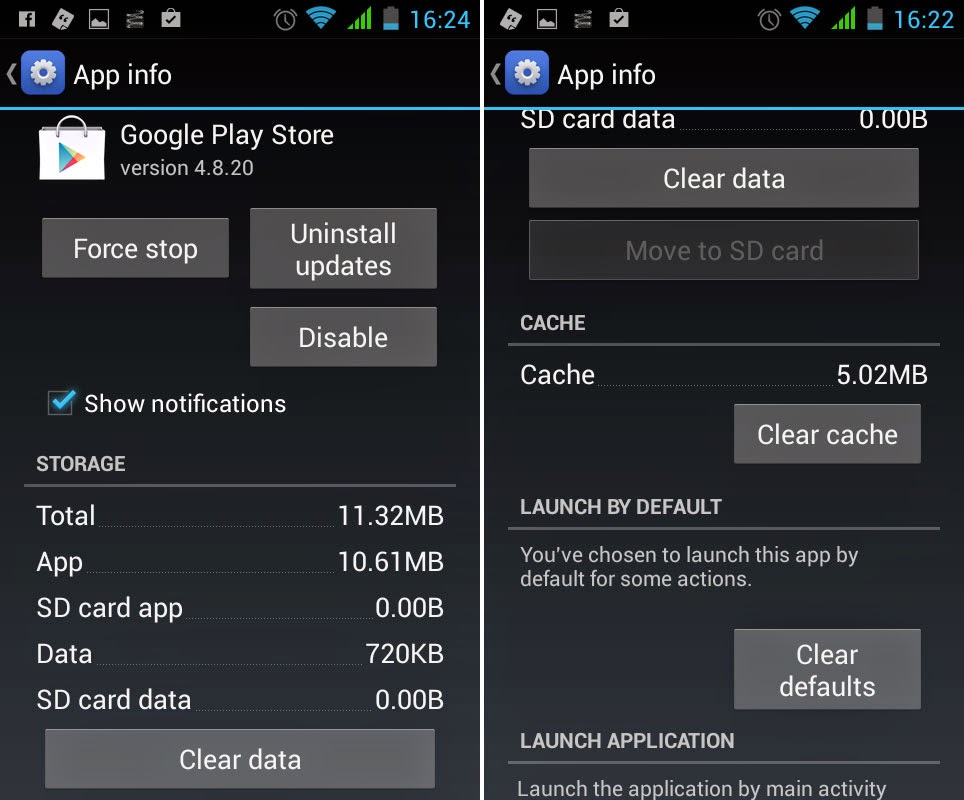
Into setting- & gt; apps- & gt; all and find google play store.Next select clear a cache to remove all a cache that is in play store.
3.Clear data Google Play Store

4.Uninstal Updates


Following a solution that can you take to overcome play store sudden strike:
1.Delete Chache Whatsapp
If your mobile phone installed whatsapp updates on 4 august 2014, then please clear a cache whatsapp you by entering settings- & gt; apps- & gt; all- & gt; whatsapp.
2.Clear Cache Google play store
Into setting- & gt; apps- & gt; all and find google play store.Next select clear a cache to remove all a cache that is in play store.
3.Clear data Google Play Store
If way above not succeed, you can try remove data by picking delete data.
If both ways above not bring results, please continue with undo
installation updates google play by picking uninstall latest
information.
5.Google Play Service
If the third way above has not yet succeeded, you can continue by
entering the settings- & gt; apps- & gt; all- & gt; google
play service.Same as third step up the stairs, you live trying to one by
one, ranging from clear a cache delete data up to uninstall latest
information.
6.Delete your Google account and restart.
Come in to settings- & gt; accounts and select account you.Next
press the button menu and select remove account.Next cellphone will
restarts and you can sign in repeated by visiting settings- & gt;
accounts.
The end of June and then Google has rolled the significant updates over
Google Voice Search service for hers. Now it is enough to mention OK
Google, users can directly search for the desired information via Google
Search App which is the default application for all Android phones. For
users who have not gained such features

Follow this step :
1.Into google search app and typewriting " OK google everywhere "


3.continue by giving tick box beside from any a screen.

4. Click I Agree to accept the terms and conditions of use specified by Google.
5. Please say Ok Google three times. After the pattern of the sound you recorded, features Ok Google is now ready for use.

6. you can also enable Google Ok when the screen is off. One thing that is noteworthy, Ok Google can only be used when the phone is charging.

Follow this step :
1.Into google search app and typewriting " OK google everywhere "
2.Next choose setting -> Voice -> Ok Google detection.
4. Click I Agree to accept the terms and conditions of use specified by Google.
5. Please say Ok Google three times. After the pattern of the sound you recorded, features Ok Google is now ready for use.
6. you can also enable Google Ok when the screen is off. One thing that is noteworthy, Ok Google can only be used when the phone is charging.
Maybe droiders is not kind of person easily lend smartphone to
another.But who can guarantee if one day, smartphone droiders who keep
many private data lost or whim opened by never responsible?
 A computer user dna-based windows maybe there are many who knows how to
menyembunyika a file or folder.Stay open file explorer, click right in
the properties, then tick an option 'hidden file' to go
wrong!But how sharply android operating system which rarely use linux?
A computer user dna-based windows maybe there are many who knows how to
menyembunyika a file or folder.Stay open file explorer, click right in
the properties, then tick an option 'hidden file' to go
wrong!But how sharply android operating system which rarely use linux?
There are several applications in google play that allows droiders to conceal files and folder in android.But why droiders have to install manifold application additional if actually step hide file jempatan easily?
Tips 1: added point way most easy to hide folder is by adding mark point (. ) in front name folder.This method will even hide the folder of applications other like galleries video players, and other application.A name change folder can be conducted by using application file manager such as ice explorer.
So, if droiders having some file personal want disembunyiakn, ai suggest to raise that money in one folder.After terkumbul, new add mark point in front name folder.
For the record, this method used to conceal folder not active or system used by the application of android.The method of unusable on folders 'downloads.'
To hidden folder, do steps following ( use application ice explorer ): open ice explorer press somewhat long folder that will droiders hide, will appear choice rename add mark point (. Front ) name folder done.
While to bring up back, moves are is as follows ( still use ice explorer ):
Tips 2: Used file '. Nomedia'
Users android could use another way to hide folder.The way is by cook file with name ".nomedia "( without the stringed ) within the folder that will be concealed.To do so follow steps below ( still use of a file manager ):

There are several applications in google play that allows droiders to conceal files and folder in android.But why droiders have to install manifold application additional if actually step hide file jempatan easily?
Tips 1: added point way most easy to hide folder is by adding mark point (. ) in front name folder.This method will even hide the folder of applications other like galleries video players, and other application.A name change folder can be conducted by using application file manager such as ice explorer.
So, if droiders having some file personal want disembunyiakn, ai suggest to raise that money in one folder.After terkumbul, new add mark point in front name folder.
For the record, this method used to conceal folder not active or system used by the application of android.The method of unusable on folders 'downloads.'
To hidden folder, do steps following ( use application ice explorer ): open ice explorer press somewhat long folder that will droiders hide, will appear choice rename add mark point (. Front ) name folder done.
While to bring up back, moves are is as follows ( still use ice explorer ):
- Use a menu acces, fast usually are in the right.Then scroll down to see a menu droiders "show hidden file "
- Change into a position on to see folder that hidden.To change statsu folder of hidden to normal again, droiders stay menegkan menu "rename"and remove mark point (. )
Tips 2: Used file '. Nomedia'
Users android could use another way to hide folder.The way is by cook file with name ".nomedia "( without the stringed ) within the folder that will be concealed.To do so follow steps below ( still use of a file manager ):
- Open folder that want droiders hide
- make a file empty with name ".nomedia " ( without the stringed ) within the folder by using application file manager.This method will hide folder of application as gallery and other applications who have access media.
Not release, a developer claimed to have succeed in doing rooting to
besutan google, the newest operating system android l.In fact, google
mempublish that os android i just could be enjoyed by the user nexus
nexus 5 and 7

But Google could not count on it. Even mengangggapnya as evidence will be simply the process of rooting your Android L, which berimpak at the discretion of developers creating new applications.
Thus, the development of the Android operating system L, faster and faster also available to users of Android devices.
Android Community, Friday (30/6/2014) reported that users who want to me-rooting Android-based handset L need a custom recovery to install SuperSU, Chainfire to then go into the bootloader and fastboot flash boot. the ' img ' according to the handset being used.
However, users who have got root access is not immediately gain access to write the program into the system. He guessed there were limitations to the application root record with an older version of the latest version of Android that is in L.
Google itself finally announced the latest version of the Android operating system with the naming of ' L ' in the Google i/o Conference, which took place not long ago. The latest version is called the most ambitious update to Android, especially because it has the design of the UI (user interface) recently.
But Google could not count on it. Even mengangggapnya as evidence will be simply the process of rooting your Android L, which berimpak at the discretion of developers creating new applications.
Thus, the development of the Android operating system L, faster and faster also available to users of Android devices.
Android Community, Friday (30/6/2014) reported that users who want to me-rooting Android-based handset L need a custom recovery to install SuperSU, Chainfire to then go into the bootloader and fastboot flash boot. the ' img ' according to the handset being used.
However, users who have got root access is not immediately gain access to write the program into the system. He guessed there were limitations to the application root record with an older version of the latest version of Android that is in L.
Google itself finally announced the latest version of the Android operating system with the naming of ' L ' in the Google i/o Conference, which took place not long ago. The latest version is called the most ambitious update to Android, especially because it has the design of the UI (user interface) recently.
Connection data on the cellphone android often accused a source of
extravagance batteries.Most users usually choose to deadly connection
data to save data.But the act is perhaps now will make your own bloody
problems.With deadly connection data, you may so will make email or
message important derived from your feilow.

Luckily, has now present cleverconnectivity that allows arrangement connection data in an ingenious manner without having missed an important message could possibly get in your cell phone.
1.Download and install Clever Connectivity.
2.Run CleverConectivity. Then you will go directly to the settings menu:
Luckily, has now present cleverconnectivity that allows arrangement connection data in an ingenious manner without having missed an important message could possibly get in your cell phone.
1.Download and install Clever Connectivity.
2.Run CleverConectivity. Then you will go directly to the settings menu:
- Data connection : tick this box to permit cleverconnectivity manage data connections 3g you.
- Data manager : Check with this box, users can determine duration of his death connection data when the screen in condition dead.
- Wifi connection : tick this box to permit cleverconnectivity manage connection wifi phones.
- Wifi manager : like his manager, data you can cycle the period of his death wifi screen when dead.
- Autosync : tick this box to cleverconnectivity can determine when synchronization automatic will turned or nonactive.
- Auto-wifi-off : wifi will disabled automatically after a certain period in accordance with which you set before when screen dead and no service benefits of wifi.
- Sleep hours : you can decide when connection data will continue to turned off.You can cycle of hours 00-06 morning for example.
- Time on : on a menu this you can now be set period active data the after-sails dead.Period calculated in unit minutes, so if you enter the numbers 1 then connection new data will die after one minute passed.Time off: with time off, you can decide the suspended public data connections the after-sails dead.
- Usage check intervals : is the sum time in unit seconds required by cleverconnectivity to check that
- Data connections ( wi-fi ) will hold 3g / for one minute after the dead.
- After passing a minute, then cleverconnectivity will take two seconds was on the phone to check whether the data.
- If the phone does not being available, using data connections then cleverconnectivity disables data connections for 10 minutes.
- exceeded; after 10 minutes connection data going back on for a minute.
- Data connections will also automatically on the phone screen start.
By buying smartphone, droiders will certainly more often using your cell
phone to surf internet.If you have more funds buy smartphone with sails
wide experience browse internet will certainly deliver more
satisfactory.
 Besides size sails, you can also turn some features on browser android
so can increase your comfort in access the internet.Some following tips
of ai you can try:
Besides size sails, you can also turn some features on browser android
so can increase your comfort in access the internet.Some following tips
of ai you can try:
1.zoom
if phone that you use having the sails small, then you can do zoom to enlarge display web you visit.If your cell phone screen has carries features multitouch, then you can use features pinch to zoom to enlarge view.Meanwhile, if screen you yet having features pinch to zoom, you can enlarge display manually by touching screen twice to appear icon zoom.
2.mode lanscape
if enlarge or zoom not enough for you, then droiders can try to surf internet in vogue landscape or horizontal.To do this, you can do it through setting.Meanwhile, if your cellphone have used android ice cream sandwich, jellybeand, kitkat then features autorotate you can activate to make browser appear in vogue landscape.
3. Web Shortcut
not all your favorite website has an official app that supports the Android platform. For it is no good as you attach a shortcut to your favorite websites on the front page. Web shortcut allows you to access the web directly from the front page of the phone without having to go first to the browser and typing in the URL address him as is often done by most users. To create a shortcut, you can simply press the home screen a few moments until selection shortcuts and do not forget to select the web and typing in the web address that You frequently visit.
4.Press and hold link
if you were open web and meet links want opened, please press and hold link charred the appear choice to open in tab new.Please pick open link in new tab to open link meant in tab new.And you also still see web first you go so very useful if you want to open many link for example.On cell phone with platform ice cream sandwich, you can open links in tab incognito yard ever visited not recorded in history.
5.Open page with application
sometimes when you vote link to open, android showing choice to open link is the browser or application.If you faced with the options, then open the link with application of an option the best
6. close the browser tab or window
when you open lots of pages in multiple tabs or Windows, don't forget to close the window or tab that You no longer wear. It is also useful to save data usage can also relieve the performance of mobile phones. To close a tab or windows, please press menu and choose windows or tab and select any tab or window you want to close.
7.refund policy
google play give you kebijakan refunds or refund policy within the period of 15 minutes after you buy application.To undo purchase application, please come into play store & gt; & gt; my menu apps.Afterwards, you choose app. you want to cancel and select refund.Then you will be asked to conduct the removal or uninstal application.So, app. erased then you will receive returning money you wear to buy application.
8.non-official apps
among some things you need to know is not all official application offers the best thing for you.Example is application tweetdeck that offer more features if compared application official artificial twitter.
1.zoom
if phone that you use having the sails small, then you can do zoom to enlarge display web you visit.If your cell phone screen has carries features multitouch, then you can use features pinch to zoom to enlarge view.Meanwhile, if screen you yet having features pinch to zoom, you can enlarge display manually by touching screen twice to appear icon zoom.
2.mode lanscape
if enlarge or zoom not enough for you, then droiders can try to surf internet in vogue landscape or horizontal.To do this, you can do it through setting.Meanwhile, if your cellphone have used android ice cream sandwich, jellybeand, kitkat then features autorotate you can activate to make browser appear in vogue landscape.
3. Web Shortcut
not all your favorite website has an official app that supports the Android platform. For it is no good as you attach a shortcut to your favorite websites on the front page. Web shortcut allows you to access the web directly from the front page of the phone without having to go first to the browser and typing in the URL address him as is often done by most users. To create a shortcut, you can simply press the home screen a few moments until selection shortcuts and do not forget to select the web and typing in the web address that You frequently visit.
4.Press and hold link
if you were open web and meet links want opened, please press and hold link charred the appear choice to open in tab new.Please pick open link in new tab to open link meant in tab new.And you also still see web first you go so very useful if you want to open many link for example.On cell phone with platform ice cream sandwich, you can open links in tab incognito yard ever visited not recorded in history.
5.Open page with application
sometimes when you vote link to open, android showing choice to open link is the browser or application.If you faced with the options, then open the link with application of an option the best
6. close the browser tab or window
when you open lots of pages in multiple tabs or Windows, don't forget to close the window or tab that You no longer wear. It is also useful to save data usage can also relieve the performance of mobile phones. To close a tab or windows, please press menu and choose windows or tab and select any tab or window you want to close.
7.refund policy
google play give you kebijakan refunds or refund policy within the period of 15 minutes after you buy application.To undo purchase application, please come into play store & gt; & gt; my menu apps.Afterwards, you choose app. you want to cancel and select refund.Then you will be asked to conduct the removal or uninstal application.So, app. erased then you will receive returning money you wear to buy application.
8.non-official apps
among some things you need to know is not all official application offers the best thing for you.Example is application tweetdeck that offer more features if compared application official artificial twitter.
Social networking sites or customarily abbreviated sns is the site most
frequently used by indonesian people when first surf internet.Facebook,
besides instagram and foursquare is social network sites who also often
used.Well by features check-in, users could easily knowing location
friend.

However, not all friend use social networking sites that together so
droides to be bothered by opening sistus similarly used by your
friend.Luckily, now there are developer application that enables you to
trace position your friend of several social network sites popular in an
integrated.Preach how:
- Download and install FacesIn from play Store.
- Open facesin and continue with login to social network sites supported covering up, foursquare, instagram and linkedin.
- After successfully logins droiders would request anyway facesin to access allowed a location and read the contents account social network you.Facesin will not post an status to social network you before ask permission first.
- The next step stay select next and continue with the finish.Next you can see the profile picture your friend complete with information distance your location with a friend.Droiders also can pick kilometers as a unit of distance by entering setting.
- To see your friends check-in, you can go to the Stories.

List lg g2 biased in root use package zip this:
- at & amp; t g2 ( d800 ) - d80010d
- verizon g2 ( vs980 vs98010b ) - ( shipping rom )
- verizon g2 ( vs980 vs98011a ) - ( ota g2 t-mobile ) ( shipping rom )
- kt f320k ( shipping rom )
- rogers d803 ( shipping rom )
- bell d803 ( shipping rom )
- telus d803 ( shipping rom ) d802
- open ( shipping rom )
The Steps :
- Download tools on here
- Make sure droiders already menginstall driver usb proper, and telephone in vogue proper ( to verizon, uses ethernet fashion on a menu arrangement pc )
- Turn on Developer mode and enable USB Debugging
- Extract the zip file that has been downloaded
- Run root.bat
- Droiders would request to sever connections, usb disable usb debugging, and activate it back up again, and high tide
- Droiders then be asked whether you want to install superuser, and you can accept or reject
Phone larger sail processor and a quad cores battery will eat more.It is
because to the amount of screen and magnitude power use to prop 4
intiprosessor.
But now, users android processor with a quad cores can save battery easily.There are many application available at google playstore to save batteries.But a quad cores manager + droiders help to save battery for smartphone android processor with a quad cores.To use this application android must in a state of root.

Features QCM+
cores control: the application it has a user interface easy to use and quite simple with some keys that allows droiders to shut one of its cores and activate it if necessary.Mode of persistent: some device we set deprogram to free cores work arbitrarily, but with features will limit system by providing control 100 % on its core used.So more can suppress endurance batteries, not all its core walked on and on.
Acoo:
this feature , called automatic cores on / off, deadly some cores when droiders not using devices android ( e.g. when screen device dead ).Cores automatically activated when device active.It is also member droiders ability to turn on or deadly cores and also gave choice to have two models an alternative to turn / disable its core.
Application to walk when android turned on: droiders should not do setting reëxamined against qcm + when android turned off, because qcm + will automatically adjust settingan previously that have adjusted.Application qcm + can downloaded for free in PlayStore.
But now, users android processor with a quad cores can save battery easily.There are many application available at google playstore to save batteries.But a quad cores manager + droiders help to save battery for smartphone android processor with a quad cores.To use this application android must in a state of root.
Features QCM+
cores control: the application it has a user interface easy to use and quite simple with some keys that allows droiders to shut one of its cores and activate it if necessary.Mode of persistent: some device we set deprogram to free cores work arbitrarily, but with features will limit system by providing control 100 % on its core used.So more can suppress endurance batteries, not all its core walked on and on.
Acoo:
this feature , called automatic cores on / off, deadly some cores when droiders not using devices android ( e.g. when screen device dead ).Cores automatically activated when device active.It is also member droiders ability to turn on or deadly cores and also gave choice to have two models an alternative to turn / disable its core.
Application to walk when android turned on: droiders should not do setting reëxamined against qcm + when android turned off, because qcm + will automatically adjust settingan previously that have adjusted.Application qcm + can downloaded for free in PlayStore.
How To Remove Ads On Applications , Advertising on the application or game are we use sometimes makes us
feel uncomfortable when being start an application / the game.At this
time ai will be slightly share tips easy menhilangkan advertising on the
application or gaming without have to do root first.

How To Remove Ads On Applications
im give an example simple.When droiders play flappy bird or application gratisan other with condition data on, the internet usually will appear / out ads in the game.Potent way to avoid ads appear surely with deadly internet connection in hp android.Then, what if you still want to be connected to the internet but no-show advertising on an application?This is it the answer!
Still same the technique with tips to remove advertising that many discussed previously namely by blocking a application / game to not ' menyedot' data the internet, of course still in application firewall, with application firewall application / game be bounded or are wall to not do any internet and "steal" quota data you to extract information from hp that droiders use and then give information balik usually form advertising.
To do that, please download noroot firewall, application firewall this can work well on hp android without root.Setting no root firewall was literally easy.Droiders see enough list application or game existing to enable application access the internet, and select fashion to position "allow" or a check mark green.Otherwise, to block application used data the internet, and select "deny" or a cross red.Good try, hopefully useful.
Keyword in this post :
How to remove ads on application android ,Tutorial Android,Ads Android,Application android,Android
How To Remove Ads On Applications
im give an example simple.When droiders play flappy bird or application gratisan other with condition data on, the internet usually will appear / out ads in the game.Potent way to avoid ads appear surely with deadly internet connection in hp android.Then, what if you still want to be connected to the internet but no-show advertising on an application?This is it the answer!
Still same the technique with tips to remove advertising that many discussed previously namely by blocking a application / game to not ' menyedot' data the internet, of course still in application firewall, with application firewall application / game be bounded or are wall to not do any internet and "steal" quota data you to extract information from hp that droiders use and then give information balik usually form advertising.
To do that, please download noroot firewall, application firewall this can work well on hp android without root.Setting no root firewall was literally easy.Droiders see enough list application or game existing to enable application access the internet, and select fashion to position "allow" or a check mark green.Otherwise, to block application used data the internet, and select "deny" or a cross red.Good try, hopefully useful.
Keyword in this post :
How to remove ads on application android ,Tutorial Android,Ads Android,Application android,Android
Files that are often sent by email are usually shaped as a rar or ZIP.
When we opened on the computer may be easier for us to open them, just
use winRAR or winZip and extract. But what if are using Android and
download the RAR files on Android? certainly in need of special
assistance.

Here's how to open a RAR and ZIP on Android :


Here's how to open a RAR and ZIP on Android :
- Download Androzip file manager first, then install in android you, after that run androizip file manager
- Looking for then choose a file rar that wantedin extract
- After choose will appear screen navigation; if you want to include in folder other could select extract, but if you want to extract in the same place could select extract here.
- If it fails, could extract here by selecting View archive
- After that select file that which me in extract, if all files could select check all, and select extract
- File folders will successfully extract such as picture below
After gtab 2.7 ente updates into jelly bean ( 4.1.1 ), rooting in os earlier ( ics 4.0 ) come lost.Well, let ' s Go how it works.

STEP 1 Root Jelly Bean 4.1.1 Galaxy Tab 2 7
Install first cwm v6 ( clockworkmod ) should be installed due to process rooting. How:
1.Open odin, enter cwm6 root _ _ p3100.tar.md5.zip ( formerly extracted first bro, yes because the file is in zip ) on columns PDA

 4. Click Flash, wait until PASS / process success.
Install first cwm v6 ( clockworkmod ) should be installed due to process rooting. How:
1.Open odin, enter cwm6 root _ _ p3100.tar.md5.zip ( formerly extracted first bro, yes because the file is in zip ) on columns PDA
2. USB, press the Power Off Volume Down long do not removable until Gtab
ente got into the mode of downloading/Flashing, after entering the
download mode press volume up to appear the words DOWNLOAD mode
3.Plug the USB again, until Odin ngedetect (yellow color in the column ID: COM)
STEP 2 Root Jelly Bean 4.1.1 Galaxy Tab 2 7
Well, after cwm attached, now way rooting
1.Put file
supersu-v0.92-mod jelly bean.zip
2.Press old power-volume up not
detachable to enter fashion cwm / recovery blue color
3.Select choose
zip from external sd card. ( the opration make buttons volume up-down to
top down, And buttons power to choose / return )
4.Select
supersu-v0.92-mod jelly bean.zip 5.Click yes, wait until install
completed 6.A turning to the menu early cwm And reboot
Done Samsung Galaxy tab 2.7 now is rooted
Samsung galaxy cores is gadget android Made vendor sasmsung who releases a while ago to the specifications the middle class.Maybe because surmounted by big names samsung make gadget this one popular in market.

To the specifications sufficient mumpuni chipset qualcomm snapdragon s4 play msm8225 with its processor dual-core arm cortex-a5 with speed 1,2ghz that combined with dedicated graphics adreno of 203 and supported by ram memory of 1gb and priced at 200$ of course.This time im will discuss the easy way root samsung galaxy cores gt-i8262 / i8260.
Tools :
- samsung galaxy core GT-i8262 atau GT -i8260.
- Framaroot. you can download the application in here
The steps:
- Install the application
- When it has in install topursue framaroot application.
- Choose "root". next choose "gandalf". waiting until proses root finish.
- If finished root-nya process, doing a restart
- Done
Note: rooting cause warranty become scorched.So ai not suggesting to perform the process are rooting for the warranty term applicable.

Samsung galaxy gio has the performance and capabilities of a reliable and trustworthy because it is already in bekali with a sophisticated network such as HSDPA with speeds of up to 7.2 mbps, which is present on the screen samsung galaxy gio capable of displaying up to 16 M colors
Processors are supporting the performance of samsung gio galaxy is relying qualcomm qct msm7227-1 turbo with the speed up to 800 mhz this time ai rooting samsung will discuss ways galaxy gio s5660
The Steps :
- Download in here
- Copy to the sdcard in the topmost folder
- Turn off the phone
- Reboot to recovery mode by pressing buttons home okay ( central ) + power
- When been in use buttons volume for navigation under upper and buttons home okay to choose
- Choose “Update from SD card” from menu recovery
- Select the file you downloaded above to begin the process
- Reboot handphone
- Done.
1.Download here filenya or here
2.Follow step as a rooting out
Installing ClockworkMod Recovery
1. Rooted Gio
2. Download the file from here
3. Copy to the sdcard in the topmost folder
4. Turn off the Mobile
5. Reboot into recovery mode by holding down the Home button/OK (Central) power
6. When already logged in please use the Volume buttons to navigate up and down the home button for select/ok
7. Select "Update from SD card" from recovery menu
8. Select the file you downloaded above to begin the process
9. Reboot mobile
10. done.

Xperia Z1 is one of the hosts of the sony vendor smartphone which is now the flagship android in the segment of upper-class, supported with a 2.2 Ghz quadcore possessors krait 400, 2 GB RAM, 16 GB internal as well as in the support screen with resolution 5 inch span with 1920x1080px increasingly make this Successful smartphone competitors.
This time im going to discuss the steps easy to Root Xperia Z1, the following steps :
- Download Vroot
- after the Vroot application download, and then install it On your PC/Laptop
- After the menginstall application install driver xperia z1 by entering a usb xperia z1 with fashion debugging to a computer / laptop and automatic driver will installed
- If already installing then the next step is to repeal and connect back cable usb to a computer / laptop in fashion debugging
- Then open application vroot, display his would be this picture above, click the button that has been designated by bow on picture above
- Xperia z1 will automatically reboot and if successful would emerge under messages like this
- Process root not over until here, droiders need m gonna download application superuser / super su in playstore,
- done.

Samsung Galaxy Mega 5.8 comes with dimensions of 5.8-inch TFT capacitive touch screen qHD display, which supports a resolution of 960 x 540 pixels. This device complete with 1.4 GHz dual-core processor, 1.5 GB of RAM and 8 GB of internal memory, which can add up to 64 GB via micro SD memory cards. This time Ai will throw light on the steps of root Samsung Galaxy Mega 5.8.
Things that need to be prepared before the Root process:
- Samsung USB drivers/Samsung kies for samsung USB drivers, can be downloaded Here
- Turn on USB Debugging mode in the Galaxy Mega 5.8 by way of:
•Open (Menu > Settings >General> Development > USB Debugging) - Backup important data such as contacts, Droiders, sms and other applications using moborobo, because in some applications allow/data will be lost during the process of application tutorial using oting, moborobo is here
- Galaxy mega must has endurance battery at least 80 % to avoid doesn't want thing while doing rooting
- Download SuperSU
- Galaxy Mega 5.8 must be already installed CWM Recovery
The Step to Root Samsung Galaxy Mega 5.8 :
- Copy the file UPDATE-SuperSU-v 1.34. zip to the external memory card (SDcard)
- Shutdown Samsung Galaxy Mega 5.8
- Enter cwm recovery by means of pressing a button following simultaneously vol up + home + power
- If already logged in select install zip from SD card external
- Select file update-supersu-v1 34 zip
- Select Yes to confirm install
- If you have already completed the process select the GO Back and select reboot system
- Done
Needless in line bawahi, process root not in legal right by the vendor, hence warranty are scorched if purposefully performs rooting at gadget android.

WhatsApp is cross platform instant messaging application with user terbabyak has now stringent increasingly compete with several other chat applications, such as FUEL We Chat, cocoa Talk etc, along with the development of technology and the increasing creativity of developers came the application of OGWhatsApp, taken from the name of its creator, Osama Ghareeb.
OGWhatsApp allows us to activate two numbers in one active WhatsApp time. OGWhatsApp does not require root access requirements and does not require anything to set it up, just install like WhatsApp in general configuration to do and then can be used.
- Install OGWhatsApp (download here) but do not open the application
- Backups whatsapp original message your ( unless you not too his selflessness )
- Clear Data WhatsApp original by the way go to Settings and select Apps, on the list of applications search WhatsApp then open it and select Clear Data. The other way is easier, reinstall your original WhatsApp
- Open sdcard manager, using a file folder rename / sdcard / whatsapp / be / ogwhatsapp / sdcard /
- Go to OGWhatsApp, register using the number who used to be in your original WhatsApp. WhatsApp for original, register with the new phone number
- More information can be found on the website
Subscribe to:
Posts
(
Atom
)