
Showing posts with label FBT. Show all posts
Showing posts with label FBT. Show all posts
How to Use MTN Bis on Android via TroidVpn + Unlimited Downloads
For over two months now, Mtn Bis have been blazing flawless on Android phones and tablets. Previously, I published a brief guide on how to use Mtn Bis on PC via tunnelguru program. Today's stroll, I would brief you guys on the guide on how to use Mtn Bis on Android phones or tablets via Troid Vpn application.

How to Use MTN Bis on Android via TroidVpn + Unlimited Downloads
For over two months now, Mtn Bis have been blazing flawless on Android phones and tablets. Previously, I published a brief guide on how to use Mtn Bis on PC via tunnelguru program. Today's stroll, I would brief you guys on the guide on how to use Mtn Bis on Android phones or tablets via Troid Vpn application.
How to Setup MTN Bis to work on Android via TroidVPN
For freshers- First create an account with tunnelguru via here and notify your user name and password.
How to Use MTN Bis on Android via TroidVpn + Unlimited Downloads
Then Download Troid Vpn android application from Google playstore or here.
NB- Troid Vpn works perfectly on Android device above version 4.04
Once you have downloaded and installed Troid VPN, then input the below setup.
- Your user name and password
- Then select any free server (for free users) or premium users, select premium servers.
- Then follow the below image for better understanding of the guide.
Once you have proceeded the setup, then click 'Advance' and input 10.199.212.2 as the proxy host and 8080 as port. Then input host:web.blackberry.com as the header, just as shown in the image below.
How to Use MTN Bis on Android via TroidVpn + Unlimited Downloads

How to Use MTN Bis on Android via TroidVpn + Unlimited Downloads
How to Use MTN Bis on Android via TroidVpn + Unlimited Downloads
Once you are through with the above setup, click save and go back, then click connect.
Advice- Free users have only 100MB allocated to them on daily basis, but premium users have unlimited data allocated to them. You can upgrade your premium account via here. If you have already upgraded your tunnelguru account, you won't need to upgrade again, because tunnelguru and Troid VPN works hand in hand.
How to Use MTN Bis on Android via TroidVpn + Unlimited Downloads
How to Use MTN Bis on Android via TroidVpn + Unlimited Downloads
Data Resellers- Get the Cheapest internet Data Plans for Smartphones and PC
Getting internet data plans from data resellers is one of the best alternatives to get huge amount data bundle plan at low rate. Most Smartphone and PC users do complain about the high consumption of there internet plans (Mostly airtel users). Before I hit the nail, let me brief you about the advantages of purchasing data bundle from a reseller.
Getting internet data plans from data resellers is one of the best alternatives to get huge amount data bundle plan at low rate. Most Smartphone and PC users do complain about the high consumption of there internet plans (Mostly airtel users). Before I hit the nail, let me brief you about the advantages of purchasing data bundle from a reseller.

Why You Should Purchase Data Bundle from A Reseller
There are great benefits of purchasing internet data plans from data resellers and these are;
- You get huge data plans at low costs (No Normal internet data plan bundle as cheap as that bought from a data reseller)
- The data count rate is very much slow. Unlike airtel data plans, you can consume 4GB within few days without downloading files, but if you purchase any data plan bundle from a data reseller, your data would last. Even the 250MB data plan purchased from a data reseller can last you for 30days talk more of 1GB.
Best Data Resellers Service
Mighty Solution is a trusted data reseller that I can stand and testify for. He offers huge and cheap plans. Below shows the list of plans he does offer;
Etisalat 250MB- #400 (via bank deposit), #500 (via Airtime)
Etisalat 500MB- #700 (via bank deposit), #800 (via Airtime)
Etisalat 1GB- #1200 (via bank deposit), #1400 (via Airtime)
MTN 1GB- #1100 (via bank deposit), #1200 (via Airtime)
The above data plan offer works on all internet enabled device, which includes you smartphones, Java phones, Symbian phones, Android phones, Windows phones, iPhones, blackberry and Computers. To check sent data plan for MTN, simply dial *461*7# & that of Etisalat, simply dial *229*9#.
To purchase any of the above data plans, simply contact Mighty Solution Service via calls or whatsapp @ 07033044456. The internet data plans that would be sent after purchase would be valid till 30days. His service is an outstanding one and once you purchase, it doesn't take upto a minute and gbam, your data is sent. So I advice you hook up with his service and enjoy the internet with no restrictions.
It's nice visiting my blog again. Am honoured by your daily visits.
On my previous post, I published a working MTN tweak for Android Phones, and I know that most android users are really enjoying theirs. I also reflected back on a working MTN tweak with MTS plus Simple server program.
Today's stroll, I would brief you on the setup of the MTN free browsing tweak for symbian phones, but before I get started, I would love you guys to be connected by joining our daily email readers to get updated. To join simply Click Here, and also Like our fb page here to get updated.

How to configure the MTN tweak on your Symbian Phones
Step 1: Move to settings of your symbian phone, and make sure that the IP and Port is set to 010.199.212.2 and 8080 and your apn is also set to web.gprs.mtnnigeria.net.
Step 2: After the above setup is proceeded, then send Fbo to 131 and you would recieve a welcome message.
NB: Not all MTN sim do recieve the welcome message, some of them do display ''Invalid Keyword'', but once yours recieve the welcome message, then you can proceed to the next step.
Step 3: Then download operamini handler Here. Uc browser can also work for it.
Step 4: On your Operamini, input the below setup.
Frontquery: 0.facebook.com%2f%3a % 0 0 a@
Then tick the remove port box and select real host, then input 0.facebook.com.
Then start blazing.
Take note that they are certain MTN sims that caps the tweak as 5mb, so if yours is capped 5mb, to make it unlimited, follow the brief procedure below.
How to make the fbo 5mb data Unlimited
First Download Sms Bomber for s60 v3 here and that of s60 v5 here.
Nb: To install the Sms bomber, you've to make sure your symbian phone is hacked and also install Ultimate power python on it. To hack your symbian phone, check in here and to download Ultimate power python pack, click here.
Step 3: On your Sms bomber, set it up to be sending Fb0 to 131 every mins.
Hope this helps. Enjoy and stay tuned by by joining our daily email readers to get updated. To join simply Click Here, and also Like our fb page here to get updated. More tweaks would soon be posted.
On my previous post, I published a working MTN tweak for Android Phones, and I know that most android users are really enjoying theirs. I also reflected back on a working MTN tweak with MTS plus Simple server program.
Today's stroll, I would brief you on the setup of the MTN free browsing tweak for symbian phones, but before I get started, I would love you guys to be connected by joining our daily email readers to get updated. To join simply Click Here, and also Like our fb page here to get updated.
How to configure the MTN tweak on your Symbian Phones
Step 1: Move to settings of your symbian phone, and make sure that the IP and Port is set to 010.199.212.2 and 8080 and your apn is also set to web.gprs.mtnnigeria.net.
Step 2: After the above setup is proceeded, then send Fbo to 131 and you would recieve a welcome message.
NB: Not all MTN sim do recieve the welcome message, some of them do display ''Invalid Keyword'', but once yours recieve the welcome message, then you can proceed to the next step.
Step 3: Then download operamini handler Here. Uc browser can also work for it.
Step 4: On your Operamini, input the below setup.
Frontquery: 0.facebook.com%2f%3a % 0 0 a@
Then tick the remove port box and select real host, then input 0.facebook.com.
Then start blazing.
Take note that they are certain MTN sims that caps the tweak as 5mb, so if yours is capped 5mb, to make it unlimited, follow the brief procedure below.
How to make the fbo 5mb data Unlimited
First Download Sms Bomber for s60 v3 here and that of s60 v5 here.
Nb: To install the Sms bomber, you've to make sure your symbian phone is hacked and also install Ultimate power python on it. To hack your symbian phone, check in here and to download Ultimate power python pack, click here.
Step 3: On your Sms bomber, set it up to be sending Fb0 to 131 every mins.
Hope this helps. Enjoy and stay tuned by by joining our daily email readers to get updated. To join simply Click Here, and also Like our fb page here to get updated. More tweaks would soon be posted.
Good day my faithful blog readers. Today's stroll, I would be breifing you guys on the Glo Unlimited Free browsing tweak that rocks on all device.
Before I get started, I'd advice you to join our daily email readers to get updated. To join simply Click Here, and also Like our fb page here to get updated.
This tweak am about publishing has been on for weeks now and it's tested and comfirmed. Without wasting much of your time I'd rather move straight to the point.

To get started:
Step 1: Migrate to Glo bounce or Glo Gbam by dialing *100*5*1# or *170*4# alternatively.
Step 2: Then Load #100 airtime and dial *127*51#
Final Step: Here is the trick, Once you have proceeded the above steps, then connect your Glo line on your device without disconnection. If you're an Android user, don't turn off your data, for symbian users, keep connected with your whatsapp then move to your browser and start flexing, same thing goes to java users. If you're a PC user, then keep your system connected and browse unlimited without disconnection.
Hope this Unlimited tweak helps, just that it's a bit stricted. Well stay tuned, a better tweak would be published here soon. Stay connected and enjoy.
For more updates like our fb page here and join our daily email readers Here.
Before I get started, I'd advice you to join our daily email readers to get updated. To join simply Click Here, and also Like our fb page here to get updated.
This tweak am about publishing has been on for weeks now and it's tested and comfirmed. Without wasting much of your time I'd rather move straight to the point.
To get started:
Step 1: Migrate to Glo bounce or Glo Gbam by dialing *100*5*1# or *170*4# alternatively.
Step 2: Then Load #100 airtime and dial *127*51#
Final Step: Here is the trick, Once you have proceeded the above steps, then connect your Glo line on your device without disconnection. If you're an Android user, don't turn off your data, for symbian users, keep connected with your whatsapp then move to your browser and start flexing, same thing goes to java users. If you're a PC user, then keep your system connected and browse unlimited without disconnection.
Hope this Unlimited tweak helps, just that it's a bit stricted. Well stay tuned, a better tweak would be published here soon. Stay connected and enjoy.
For more updates like our fb page here and join our daily email readers Here.
Good day my failthful readers. Hope you're really enjoying your day. On our previous tweak section, I posted a working MTN tweak with MTS plus Simple server program, I know some of you are still surfing the internet free with the tweak.
Today's stroll, I would quickly brief you guys on a working MTN tweak for your Android phones.
Before I get started, I would love every one of you to join our constant readers and get updated with any latest tweak we are to publish, don't miss out, it is free.
To join simply Click Here and get it via mails.

How to configure the MTN tweak on your android phone.
Step 1. Make sure that your device IP and Port is set to:
IP: 010.199.212.2 and Port: 8080. To check/set, move to settings=> Mobile network=> Apn.. Then check the fields if it already exists.
Step 2. Send Fbo to 131 and wait till you recieve a welcome message.
Step 3. Download operamini handler in apk format here or UCbrowser Here and open, the child lock code is www.nextwap.net
Step 4. Once you open the operamini/Ucbrowser handler, then the handler menu (Fields), you are to input the below setup.
Frontquerry: 0.facebook.com%2f%3a % 0 0 a@
Then tick remove port.
Select Real host and input 0.facebook.com
Save the field setup and enter. Then start flexing.
Take note that they are some MTN sim that caps the tweak as 5mb, so if yours is capped 5mb, to make it unlimited, follow the brief procedure below.
#1. Download Sms scheduler from playstore Here or download directly, here.
#2. Then set it... Type the number which is 131, and message which is fb0, then tap the date and move it to the next time, tap 3mins then add.
With this software, it would help send the Fb0 message automatically every 3mins. With that, the 5MB capped plan would be increased and becomes unlimited.
Hope this helps!!! Enjoy Unlimitly. Simpleserver for android latest verion would soon be posted with it's latest tweak, so stay tuned.
Today's stroll, I would quickly brief you guys on a working MTN tweak for your Android phones.
Before I get started, I would love every one of you to join our constant readers and get updated with any latest tweak we are to publish, don't miss out, it is free.
To join simply Click Here and get it via mails.
How to configure the MTN tweak on your android phone.
Step 1. Make sure that your device IP and Port is set to:
IP: 010.199.212.2 and Port: 8080. To check/set, move to settings=> Mobile network=> Apn.. Then check the fields if it already exists.
Step 2. Send Fbo to 131 and wait till you recieve a welcome message.
Step 3. Download operamini handler in apk format here or UCbrowser Here and open, the child lock code is www.nextwap.net
Step 4. Once you open the operamini/Ucbrowser handler, then the handler menu (Fields), you are to input the below setup.
Frontquerry: 0.facebook.com%2f%3a % 0 0 a@
Then tick remove port.
Select Real host and input 0.facebook.com
Save the field setup and enter. Then start flexing.
Take note that they are some MTN sim that caps the tweak as 5mb, so if yours is capped 5mb, to make it unlimited, follow the brief procedure below.
#1. Download Sms scheduler from playstore Here or download directly, here.
#2. Then set it... Type the number which is 131, and message which is fb0, then tap the date and move it to the next time, tap 3mins then add.
With this software, it would help send the Fb0 message automatically every 3mins. With that, the 5MB capped plan would be increased and becomes unlimited.
Hope this helps!!! Enjoy Unlimitly. Simpleserver for android latest verion would soon be posted with it's latest tweak, so stay tuned.
Good day my lovely readers.
Without much say, today's stroll, I would be updating you on the latest Etisalat/MTN tweak that rocks with Yourfreedom app on Android smartphones and PC.
Simply follow the below settings:
First open an account with them Here and also download Your freedom app for your android device which is in 'apk' format and also for your PC which is in 'exe' format.

Then for both Mtn and Etisalat users, simply download dns chnger for your android device here or from playstore.
Alternative Dns:
Click on Set
Secondary Dns:
....connect modem for PC users, connect YF and make sure you place port at 8080.
I must advice you to upgrade your YF account for better speed.
Let us know if you got any problem with the tweak above.
You can also enjoy the below blazing tweaks.
1. Etisalat tweak blazing wella with the use of PC.
2. Etisalat still blazing with openvpn on PC
3. Mtn Blazing like hell with SS program and MTS on PC and many more tweaks.....
Less I forget, try and join our feed readers, so that all our future updates would be directly sent to your email. To join click Here.
Without much say, today's stroll, I would be updating you on the latest Etisalat/MTN tweak that rocks with Yourfreedom app on Android smartphones and PC.
Simply follow the below settings:
First open an account with them Here and also download Your freedom app for your android device which is in 'apk' format and also for your PC which is in 'exe' format.
Then for both Mtn and Etisalat users, simply download dns chnger for your android device here or from playstore.
Alternative Dns:
Click on Set
Secondary Dns:
....connect modem for PC users, connect YF and make sure you place port at 8080.
I must advice you to upgrade your YF account for better speed.
Let us know if you got any problem with the tweak above.
You can also enjoy the below blazing tweaks.
1. Etisalat tweak blazing wella with the use of PC.
2. Etisalat still blazing with openvpn on PC
3. Mtn Blazing like hell with SS program and MTS on PC and many more tweaks.....
Less I forget, try and join our feed readers, so that all our future updates would be directly sent to your email. To join click Here.
Good day my faithful readers, you guys must have noticed my absense for a week now.
Well am back now, it was actually a painful moment durning the week.
Today, am going to unviel the long awaited etisalat tweak for PC users.
All thanks to Mr YKTSAGERO for this great tweak coded by him durning my absense.
Without much say,
Simply get an etisalat sim with 0.0k on it.
You can thether the internet with your mobile device or directly with the use of modem just with it's default settings.
Features of the tweak:
==> Rocks with the speed of 1mb/s
==> High quality streaming with no buffering
==> No Upgrade required (101% Free)
To get started, simply download the X-T program here.
Open and extract the program, then run on your PC.
RUN XT> PROFILE > CHOOSE [[FAST]] > SAVE > CLOSE > CLICK LISTEN > CONNECT YOUR MODEM > CONNECT YOUR ACCESS POINT > SET APPX TO LISTEN TO 127.0.0.1:8080
Remember, that the IP and Port setup goes to your browser. 127.0.0.1 and port 8080.
The program would request for p.code for some locked profile, just ignore and flex with the first.
Once more, All thanks to Mr YKTSAGERO for this great tweak.
If your experience any problem durning the setup then don't hesitate to let us know, and get it resolved in the comment section.
Enjoy while it lasts...
I would love your shares. Enjoy and stay tuned..... Join our mail subscribers to be updated, its free. Just Click Here
Well am back now, it was actually a painful moment durning the week.
Today, am going to unviel the long awaited etisalat tweak for PC users.
All thanks to Mr YKTSAGERO for this great tweak coded by him durning my absense.
Without much say,
Simply get an etisalat sim with 0.0k on it.
You can thether the internet with your mobile device or directly with the use of modem just with it's default settings.
Features of the tweak:
==> Rocks with the speed of 1mb/s
==> High quality streaming with no buffering
==> No Upgrade required (101% Free)
To get started, simply download the X-T program here.
Open and extract the program, then run on your PC.
RUN XT> PROFILE > CHOOSE [[FAST]] > SAVE > CLOSE > CLICK LISTEN > CONNECT YOUR MODEM > CONNECT YOUR ACCESS POINT > SET APPX TO LISTEN TO 127.0.0.1:8080
Remember, that the IP and Port setup goes to your browser. 127.0.0.1 and port 8080.
The program would request for p.code for some locked profile, just ignore and flex with the first.
Once more, All thanks to Mr YKTSAGERO for this great tweak.
If your experience any problem durning the setup then don't hesitate to let us know, and get it resolved in the comment section.
Enjoy while it lasts...
I would love your shares. Enjoy and stay tuned..... Join our mail subscribers to be updated, its free. Just Click Here
For months now Mtn users have been rocking the MTS plus the Simple server tweak.
It's time for all etisalat Pc users to rise and shine for thou tweak has risen again.
Before I get started, I would love every one of you to join our constant readers and get updated with any latest tweak we are to publish, don't miss out, it is free.
To join simply Click Here and get it via mails.
Now I can fire on with the tweak...
Of course, Today's stroll would be layed on the vexing matter of etisalat plus openvpn on Pc. Lol!
I know that most of you are excited and wants to start blazing this tweak, It's totally free and blaze even with #0.0K on your sim.
Requirements:
1. Etisalat Sim
2. Openvpn and Filter proxy Lite.
3. Of course your computer is also included.
All you need to do is to download the openvpn program and the filter proxy lite and all required setup needed is explained in the downloaded folder and the setup is easy and self explainatory.
All thanks to ICTvpn owner, if you have not registed on their website, do that here.
Blaze with this tweak while it lasts...
It's time for all etisalat Pc users to rise and shine for thou tweak has risen again.
Before I get started, I would love every one of you to join our constant readers and get updated with any latest tweak we are to publish, don't miss out, it is free.
To join simply Click Here and get it via mails.
Now I can fire on with the tweak...
Of course, Today's stroll would be layed on the vexing matter of etisalat plus openvpn on Pc. Lol!
I know that most of you are excited and wants to start blazing this tweak, It's totally free and blaze even with #0.0K on your sim.
Requirements:
1. Etisalat Sim
2. Openvpn and Filter proxy Lite.
3. Of course your computer is also included.
All you need to do is to download the openvpn program and the filter proxy lite and all required setup needed is explained in the downloaded folder and the setup is easy and self explainatory.
All thanks to ICTvpn owner, if you have not registed on their website, do that here.
Blaze with this tweak while it lasts...
For the past months now, Mtn users have been flexing freebrowsing tweak on PC with the use of simple server and mts/fbtools.
Today's stroll, I would be briefing you on the best internet data subscription for your smartphones and PC.

1. MTN MID-NIGHT PLAN:
I do recommend Mtn mid-night plan for smartphone users and most especially PC users. This plan is capped 4.5GB, that is, 3GB for night plans and 1.5GB bonus thata can be used throughout the day.
Actually, the cost of this plan is #2,500 and to opt-in to the plan, simply text "102" to "131".
The more reason I recommend this plan for PC users is because they can make use of the 3GB plan durning the day with the help of their VPN and Simple server program.
2. GLOBALCOM:
Of course we all are aware of the recently lauched Glo data package that enables us to purchase 1.6GB for #2000. This plan might seems reasonable for some people but others consider it costly.
Read full details »
Today's stroll, I would be briefing you on the best internet data subscription for your smartphones and PC.
1. MTN MID-NIGHT PLAN:
I do recommend Mtn mid-night plan for smartphone users and most especially PC users. This plan is capped 4.5GB, that is, 3GB for night plans and 1.5GB bonus thata can be used throughout the day.
Actually, the cost of this plan is #2,500 and to opt-in to the plan, simply text "102" to "131".
The more reason I recommend this plan for PC users is because they can make use of the 3GB plan durning the day with the help of their VPN and Simple server program.
2. GLOBALCOM:
Of course we all are aware of the recently lauched Glo data package that enables us to purchase 1.6GB for #2000. This plan might seems reasonable for some people but others consider it costly.
Mtn is now blazing, Reloaded with simple server + the use of openvpn, this tweak is rocking wella.
This tweak goes to all Mtn users, not tested on symbian mobile but you can try the settings, as for Pc users, its working well.
Before i get started, i would love every one of you to join our constant readers and get updated with any latest tweak we are to publish, don't miss out, it is free.
To join simply Click Here and get it via mails.
As i proceed, i would start by thanking the LINUX Lab (Indonesia simple server developers)
First download the Simple server file Here.
Then, open the zip file and extract the folder to your desktop.
Before you open the simpleserver.exe, make sure that your modem is in your computer and then send FB0 to 131, zero digit i mean.
Then open your openvpn. Details on how to launch your openvpn Click Here, after getting the full detail, then, replace the cofig file from those detail with the cofig file Here
After that, get your modem connected, then launch your openvpn and select any of those servers provided and connect.
Finally, move to the simpleserver.exe open, then minimize, then go to your browser and do the below setup.
Options == Network == Settings, then tick the use of manual settings box and input:
Host/IP : 127.0.0.1
Port: 8080
then save.....
Then you can start surfing free with your PC via Mtn Line...
Once it get disconnected, simply resend the FB0 to 131
For automated sending whenever it disconnects, the the FB0 tool is recommended. Download it here
Hope this helps........
Symbian users can comment if they need the settings...
Don't hesitate to drop your comments if you have any issue with this tweak.
This tweak goes to all Mtn users, not tested on symbian mobile but you can try the settings, as for Pc users, its working well.
Before i get started, i would love every one of you to join our constant readers and get updated with any latest tweak we are to publish, don't miss out, it is free.
To join simply Click Here and get it via mails.
As i proceed, i would start by thanking the LINUX Lab (Indonesia simple server developers)
First download the Simple server file Here.
Then, open the zip file and extract the folder to your desktop.
Before you open the simpleserver.exe, make sure that your modem is in your computer and then send FB0 to 131, zero digit i mean.
Then open your openvpn. Details on how to launch your openvpn Click Here, after getting the full detail, then, replace the cofig file from those detail with the cofig file Here
After that, get your modem connected, then launch your openvpn and select any of those servers provided and connect.
Finally, move to the simpleserver.exe open, then minimize, then go to your browser and do the below setup.
Options == Network == Settings, then tick the use of manual settings box and input:
Host/IP : 127.0.0.1
Port: 8080
then save.....
Then you can start surfing free with your PC via Mtn Line...
Once it get disconnected, simply resend the FB0 to 131
For automated sending whenever it disconnects, the the FB0 tool is recommended. Download it here
Hope this helps........
Symbian users can comment if they need the settings...
Don't hesitate to drop your comments if you have any issue with this tweak.
Good day my blog readers.
Today's stroll, I would be briefing you on how to borrow airtime from Airtel, MTN and Glo network.
Getting a loan service from all network provider is a good thing and it is very helpful in terms of emergencies.

No long story, just follow the brief instructions below:
Airtel:
To get loan service from airtel network, simply dial *500#.
Once you have dialed the code above, you would then be given priviledge to select from the alternatives that would be provided to you.
Note: You would be charged #5 on any airtime borrowed on airtel network, that is, if you borrowed #100 credit, you would be credited with #95.
Globalcom:
To get loan service from Glo network, simply dial *321#.
Then after dialing the above code, you would be asked to create a four digit pin code. Eg:- 1234
Once you have generated the pin, then you would be eligible to request for a loan on glo network.
To request for a loan, simply dial *321*pin*amount#.
For instance, if I want borrow #100 airtime from glo network, and I generated "1234" as the pin, then I would simply dial, *321*1234*100# and would be credited would that amount immediately.
Note: On Glo network, 5% of your borrowed airtime belongs to their network.
MTN:
To borrow airtime from Mtn network, simply dial *606#.
On Mtn network, you can only borrow if you are on prepaid service and have upto 0-12 Naira airtime balance on you sim.
Once you have dialed the above code, you would know if you are eligible for the service from the menu or not.
Note: Mtn network would gain 10% share from the borrowed airtime.
Conclusion:
This service is very much helpful but I advice you to always pay back after the loan.
Note:-
For all the network providers listed above, the amount that you have recharged before, that is the amount that you are eligible to borrow.
Hope this brief information helps.
We would be glad if you join our email subscribers.
To join simply Click Here and get all our updates via your mail box. It's free.
Today's stroll, I would be briefing you on how to borrow airtime from Airtel, MTN and Glo network.
Getting a loan service from all network provider is a good thing and it is very helpful in terms of emergencies.
No long story, just follow the brief instructions below:
Airtel:
To get loan service from airtel network, simply dial *500#.
Once you have dialed the code above, you would then be given priviledge to select from the alternatives that would be provided to you.
Note: You would be charged #5 on any airtime borrowed on airtel network, that is, if you borrowed #100 credit, you would be credited with #95.
Globalcom:
To get loan service from Glo network, simply dial *321#.
Then after dialing the above code, you would be asked to create a four digit pin code. Eg:- 1234
Once you have generated the pin, then you would be eligible to request for a loan on glo network.
To request for a loan, simply dial *321*pin*amount#.
For instance, if I want borrow #100 airtime from glo network, and I generated "1234" as the pin, then I would simply dial, *321*1234*100# and would be credited would that amount immediately.
Note: On Glo network, 5% of your borrowed airtime belongs to their network.
MTN:
To borrow airtime from Mtn network, simply dial *606#.
On Mtn network, you can only borrow if you are on prepaid service and have upto 0-12 Naira airtime balance on you sim.
Once you have dialed the above code, you would know if you are eligible for the service from the menu or not.
Note: Mtn network would gain 10% share from the borrowed airtime.
Conclusion:
This service is very much helpful but I advice you to always pay back after the loan.
Note:-
For all the network providers listed above, the amount that you have recharged before, that is the amount that you are eligible to borrow.
Hope this brief information helps.
We would be glad if you join our email subscribers.
To join simply Click Here and get all our updates via your mail box. It's free.
Symbian users, Kindly follow the instructions stated below.
First text FB0 to 131, the Zero digit i mean.
Then Download This app Here
If you don't have the Ultimate python pack to power the app, then download it Here
Before i get started, i would love every one of you to join our constant readers and get updated with any latest tweak we are to publish, don't miss out, it is free.
To join simply Click Here and get it via mails.
Goto settings, then Create new access point With The following Details:-
Apn:- web.gprs.mtnnigeria.net
IP:- 127.0.0.1
Port:- 8080
Now Open The App You downloaded frm d link provided above:-
Acess Point:- Default
Local Host:- 127.0.0.1
Local Port:- 8080
Click On HTTP Query:-
Frontquery:- None
Middle Qury:- None
Back Query:- None
Reverse Query:- None
Inject Query:- 0.facebook.com/home.php
Inject Method:- HEAD
Inject Newline:- rÖn
Inject SplitLINE:- Default
Click on HTTP Header:-
Add/del/rep Header 1 :- Host
Add/del/rep Header value 1 :- 0.facebook.com
Add/del/rep header 2 :- None
Add/del/rep Header value 2 :- None
Add/del/rep Header 3 :- None
Add/del/rep Header value 3 :- None
Add/del/rep Header 4 :- None
Add/del/rep Header value 4 :- None
Click On server Config:-
Fetch Server:- None
Keep Server:- None
Url Replacer:- None
Advaced Mode:- None
Tunel Proxy:- None
Https Connection:- Yes
Server Buffer:- 1024
Screen size:- Normal
Proxy Host:- 10.199.212.2
Proxy Port:- 8080
Then save and Exit the app, then open back and minimize.
Move to any of your default browser, ucweb or operamini.
Do not use the modified browser or browsers with handler menu.
For instance, only make use of the normal operamini downloaded from m.opera.com
Android users, check back on us regulary for a different tweak, simple server app is still under construction for your device.
Hope this helps, If you have any issue with the setup, let us know.
First text FB0 to 131, the Zero digit i mean.
Then Download This app Here
If you don't have the Ultimate python pack to power the app, then download it Here
Before i get started, i would love every one of you to join our constant readers and get updated with any latest tweak we are to publish, don't miss out, it is free.
To join simply Click Here and get it via mails.
Goto settings, then Create new access point With The following Details:-
Apn:- web.gprs.mtnnigeria.net
IP:- 127.0.0.1
Port:- 8080
Now Open The App You downloaded frm d link provided above:-
Acess Point:- Default
Local Host:- 127.0.0.1
Local Port:- 8080
Click On HTTP Query:-
Frontquery:- None
Middle Qury:- None
Back Query:- None
Reverse Query:- None
Inject Query:- 0.facebook.com/home.php
Inject Method:- HEAD
Inject Newline:- rÖn
Inject SplitLINE:- Default
Click on HTTP Header:-
Add/del/rep Header 1 :- Host
Add/del/rep Header value 1 :- 0.facebook.com
Add/del/rep header 2 :- None
Add/del/rep Header value 2 :- None
Add/del/rep Header 3 :- None
Add/del/rep Header value 3 :- None
Add/del/rep Header 4 :- None
Add/del/rep Header value 4 :- None
Click On server Config:-
Fetch Server:- None
Keep Server:- None
Url Replacer:- None
Advaced Mode:- None
Tunel Proxy:- None
Https Connection:- Yes
Server Buffer:- 1024
Screen size:- Normal
Proxy Host:- 10.199.212.2
Proxy Port:- 8080
Then save and Exit the app, then open back and minimize.
Move to any of your default browser, ucweb or operamini.
Do not use the modified browser or browsers with handler menu.
For instance, only make use of the normal operamini downloaded from m.opera.com
Android users, check back on us regulary for a different tweak, simple server app is still under construction for your device.
Hope this helps, If you have any issue with the setup, let us know.
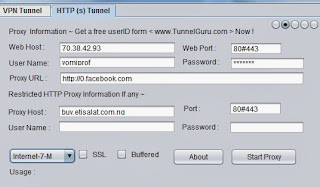
Etisalat tweak is now rocking fully with tunnelguru on pc.
To get started first:-
1> Install -JAVA7 [ http://Tunnelguru.com/java ] Recommended use this java
2> Quick Register - http://tunnelguru.com/registration.php
3> Downlaod from here - http://tunnelguru.com/download.php
First Update TG no [ TG Client->About Box] in web account.
download v2.6.1.0 from here now -32 bit
download v2.6.1.0 from here now - 64 bit
download v2.6.1.0 from here now -32 bit
download v2.6.1.0 from here now - 64 bit
Use following settings:
In Mozilla point to 6052 for all protocol.
If you Proxifier you can use port 6054/6055/6056.
In Mozilla point to 6052 for all protocol.
If you Proxifier you can use port 6054/6055/6056.
Server IP: [ Enter in Web Host ]
95.211.191.132 [ Netherlands-1 ] ( TORRENT Allowed )
95.211.191.170 [ Netherlands-2 ] ( TORRENT Allowed )
70.38.42.92 [ Canada-1 ]
70.38.42.93 [ Canada-2 ]
199.189.110.28 [ USA-1 ]
199.189.110.29 [ USA-2 ]
46.23.64.83 [ UK-1 ]
46.23.64.84 [ UK-2 ]
Disable Antivirus for better speed!!!
Note:- free users can only open tunnelguru.com,
to pay for voucher visit:- http://vpnvouchers.net/TunnelGURU-Vpn.html
95.211.191.132 [ Netherlands-1 ] ( TORRENT Allowed )
95.211.191.170 [ Netherlands-2 ] ( TORRENT Allowed )
70.38.42.92 [ Canada-1 ]
70.38.42.93 [ Canada-2 ]
199.189.110.28 [ USA-1 ]
199.189.110.29 [ USA-2 ]
46.23.64.83 [ UK-1 ]
46.23.64.84 [ UK-2 ]
Disable Antivirus for better speed!!!
Note:- free users can only open tunnelguru.com,
to pay for voucher visit:- http://vpnvouchers.net/TunnelGURU-Vpn.html
VPN over HTTP
If you want to use VPN over HTTP..First Start HTTP Tunnel
( above steps)
Then Come to VPN TAB and Start VPN ( following exact
settings-screenshot).
Please note: Use both HTTP and VPN server from same
location.
Say You have first started HTTP using any UK
location server , Then use TCP VPN server from UK
location only.
If you are usign VPN do not forget to REMOVE proxy
setigns from individual application like Mozilla etc..
Check the below image for guide:


Enjoy this tweak.............. tested and comfirmed.................
If you encounter any problem or have any issue, let us know.
We are back with another simple server tweak which rocks well on symbian and Pc.
First Download This app Here
Goto settings, Then Create new access point With The following Details:-
First MTN SIM WIT 0.0KoBo,
Second Send 'FB0' to '131'
The zero is Digital,,
!!! Note if the u're
browsing and you found out is not loading...,
just resend Fb0 to 131,
You are back on track,,
Goto settings,
Create new access point
Name Anyting you like Mine is MTN,
Apn:- web.gprs.mtnnigeria.net
IP:- 127.0.0.1
Port:- 8080
Now Open The simpleserver app
Acess Point:- choose the access point name you created
i.e Mtn
Local Host:- 127.0.0.1
Local Port:- 8080
Click On
HTTP Query:-
Frontquery:- None
Middle Qury:- None
Back Query:- None
Reverse Query:- None
Inject Query:- 0.facebook.com/download.php
Inject Method:- HEAD
Inject Newline:- \r\n
Inject SplitLINE:- Default
Click on HTTP Header:-
Add/Del/Rep Header 1 :
Http
Add/Del/Rep Header 1 :
Music.vodafone.com.tr
Add/Del/Rep Header 2 :
0.facebook.com/download.php
Add/Del/Rep Header 2 : none
Add/Del/Rep Header 3 :
wap.mtnonlineplay.com
Others shul be : None
Click On server Config:-
Fetch Server:- none
Keep Server:- None
Url Replacer:- None
Advaced Mode:- yes
Tunel Proxy:- No
Https Connection:- yes
Server Buffer:- 1024
Screen size:- Normal
Proxy
Host:- 10.199.212.2
Proxy Port:- 8080
Exit and Open it again
You can use any of the browsers, Ucweb, *Opera*,
then Connect with the access point you created
Leave Exit dn Open it again::::::::::::::::
Nao goto ur Ucweb, Opera Den Connect with d access point u created In D first Place:::::::::::::::::::
Note:- Dc App Rocks Faster On Opera12. If dc is not Working 4u, dt Meanz Ur Phone Need special Diliverance Session... Bt u can Drop ur comment at guruswizard.com Or Beta still follow me on twitter=>@guruswizards 4 beta deliverance service..lolx
PC users kindly download the file HERE. Everything is well explained there, just read the note in the file. Then the simpleserver.ini is for that old etisalat tweak simply download the recent one HERE and extract the simpleserver.ini and relace with the other one.
Android users download simple server Here, and follow the settings above.
As for those who complains that the tweak is 3mb capped, simple send Stop to 131 and resend "FB0" to "131", and once it caps 3mb again keep resending..
But to overcome the stress of resending, then Kindly subscribe for facebook 1month for #60 FBM to 131 then use it to surf the tweak unlimitedly..
Encounter any problem, let me know...
Last Edited 2/12/2013
First Download This app Here
Goto settings, Then Create new access point With The following Details:-
First MTN SIM WIT 0.0KoBo,
Second Send 'FB0' to '131'
The zero is Digital,,
!!! Note if the u're
browsing and you found out is not loading...,
just resend Fb0 to 131,
You are back on track,,
Goto settings,
Create new access point
Name Anyting you like Mine is MTN,
Apn:- web.gprs.mtnnigeria.net
IP:- 127.0.0.1
Port:- 8080
Now Open The simpleserver app
Acess Point:- choose the access point name you created
i.e Mtn
Local Host:- 127.0.0.1
Local Port:- 8080
Click On
HTTP Query:-
Frontquery:- None
Middle Qury:- None
Back Query:- None
Reverse Query:- None
Inject Query:- 0.facebook.com/download.php
Inject Method:- HEAD
Inject Newline:- \r\n
Inject SplitLINE:- Default
Click on HTTP Header:-
Add/Del/Rep Header 1 :
Http
Add/Del/Rep Header 1 :
Music.vodafone.com.tr
Add/Del/Rep Header 2 :
0.facebook.com/download.php
Add/Del/Rep Header 2 : none
Add/Del/Rep Header 3 :
wap.mtnonlineplay.com
Others shul be : None
Click On server Config:-
Fetch Server:- none
Keep Server:- None
Url Replacer:- None
Advaced Mode:- yes
Tunel Proxy:- No
Https Connection:- yes
Server Buffer:- 1024
Screen size:- Normal
Proxy
Host:- 10.199.212.2
Proxy Port:- 8080
Exit and Open it again
You can use any of the browsers, Ucweb, *Opera*,
then Connect with the access point you created
Leave Exit dn Open it again::::::::::::::::
Nao goto ur Ucweb, Opera Den Connect with d access point u created In D first Place:::::::::::::::::::
Note:- Dc App Rocks Faster On Opera12. If dc is not Working 4u, dt Meanz Ur Phone Need special Diliverance Session... Bt u can Drop ur comment at guruswizard.com Or Beta still follow me on twitter=>@guruswizards 4 beta deliverance service..lolx
PC users kindly download the file HERE. Everything is well explained there, just read the note in the file. Then the simpleserver.ini is for that old etisalat tweak simply download the recent one HERE and extract the simpleserver.ini and relace with the other one.
Android users download simple server Here, and follow the settings above.
As for those who complains that the tweak is 3mb capped, simple send Stop to 131 and resend "FB0" to "131", and once it caps 3mb again keep resending..
But to overcome the stress of resending, then Kindly subscribe for facebook 1month for #60 FBM to 131 then use it to surf the tweak unlimitedly..
Encounter any problem, let me know...
Last Edited 2/12/2013
Yipee, as chrismas is by the corner, different telecomminucation are running different packages, now airtel is back with the package everyone would love to have.
This particle package allows you to surf internet free with a limit of 1GB per month, make several google search, read mails on gmail for free. No data usage to be spent, infact its a really cool Kind of package.
Recommended:- Glo introduces a new Xmas bunty package which gives you 200% of your recharge
Airtel free zone is what am talking about. I call this package a super package for internet fricks like us.

To get started:-
==>Visit http://www.africa.airtel.com/wps/wcm/connect/africarevamp/nigeria/home/personal/internet/services/freezone from your phone internet browser
==>Then start searching or sign in with your Googleaccount to access Gmail
==>If you don’t already have a Gmail account, you can sign up here.
Or you can simply send Free Zone to 881 and it will be activated for you.
Hope this helps!!!
This particle package allows you to surf internet free with a limit of 1GB per month, make several google search, read mails on gmail for free. No data usage to be spent, infact its a really cool Kind of package.
Recommended:- Glo introduces a new Xmas bunty package which gives you 200% of your recharge
Airtel free zone is what am talking about. I call this package a super package for internet fricks like us.
To get started:-
==>Visit http://www.africa.airtel.com/wps/wcm/connect/africarevamp/nigeria/home/personal/internet/services/freezone from your phone internet browser
==>Then start searching or sign in with your Googleaccount to access Gmail
==>If you don’t already have a Gmail account, you can sign up here.
Or you can simply send Free Zone to 881 and it will be activated for you.
Hope this helps!!!
Its being spread round that etisalat bis is now working on Non - Blacberry device.
Early this morning i recieved mail from almost 16 visitors on my blog complaining that they tried re-activating for the Etisalat Bis again but it gave them tough times.
Here are some complains:-
=>I tried to re-activate the second time but my credit was deducted for BB10 autorenewal and then i load extra #100 for the monthly/weekly subscription but still not working.
Some even went as far as calling the customer service that the etisalat Bis isn't working on there android device, after that there 15mb wiped off, each time trying to put there 3G data on, then an icon which reads like a sign into the network appears on there device.
Other complains are from newbies that just needed to subscribe for the first time, but the 3078 is given and remains intact with browsing and many more related issues.
Well here are the solutions to these problems listed above.
=>If your data plan is still intact but your 3G data network changes its icon into another different icon and your 15mb wiped off, simply call the customer care service, only them can restore your 3g!!
Talk to a geek,
After he had help you restore it, tell him to help you activate your bb10 plan. Finish.
He might ask if you use a bb10 phone. tell him yes, But your sim is currently not in the phone. Thats all.
=>If you are subscribing again and have not call the customer service to opt-out in the previous BB10 daily, Know that once you load another recharge card, it would be deducted for autorenewal and once its being renewed then you have missed the steps on activating the etisalat bis. so i advice you to first call for the de-activation of the previous BB10 daily plan before recharging for another subscription, But if unfortunately yours was being renewed before subscribing, simply call the customer service to opt-out the BB10 daily plan, then re-subscribe for the BB10 daily plan to add up with your monthly or weekly plan.
=>If you just subscribed for the first time and followed the steps very well and still the Plan is intact but not browsing with it, then call the customer service for re-fund, they would do just as that in the next 24hrs, then after your credit id being restored you can try the procedure again.
Note:-Monthly/weekly subscribtion first before that of the BB10 daily.
If you have a different issue, then reply on the comment box and we would provide a solution for that.
Hope this helps!!!
Early this morning i recieved mail from almost 16 visitors on my blog complaining that they tried re-activating for the Etisalat Bis again but it gave them tough times.
Here are some complains:-
=>I tried to re-activate the second time but my credit was deducted for BB10 autorenewal and then i load extra #100 for the monthly/weekly subscription but still not working.
Some even went as far as calling the customer service that the etisalat Bis isn't working on there android device, after that there 15mb wiped off, each time trying to put there 3G data on, then an icon which reads like a sign into the network appears on there device.
Other complains are from newbies that just needed to subscribe for the first time, but the 3078 is given and remains intact with browsing and many more related issues.
Well here are the solutions to these problems listed above.
=>If your data plan is still intact but your 3G data network changes its icon into another different icon and your 15mb wiped off, simply call the customer care service, only them can restore your 3g!!
Talk to a geek,
After he had help you restore it, tell him to help you activate your bb10 plan. Finish.
He might ask if you use a bb10 phone. tell him yes, But your sim is currently not in the phone. Thats all.
=>If you are subscribing again and have not call the customer service to opt-out in the previous BB10 daily, Know that once you load another recharge card, it would be deducted for autorenewal and once its being renewed then you have missed the steps on activating the etisalat bis. so i advice you to first call for the de-activation of the previous BB10 daily plan before recharging for another subscription, But if unfortunately yours was being renewed before subscribing, simply call the customer service to opt-out the BB10 daily plan, then re-subscribe for the BB10 daily plan to add up with your monthly or weekly plan.
=>If you just subscribed for the first time and followed the steps very well and still the Plan is intact but not browsing with it, then call the customer service for re-fund, they would do just as that in the next 24hrs, then after your credit id being restored you can try the procedure again.
Note:-Monthly/weekly subscribtion first before that of the BB10 daily.
If you have a different issue, then reply on the comment box and we would provide a solution for that.
Hope this helps!!!
Its been a while now most of my friends have been flexing Mtn bis, seems like Mtn bis is now rocking on Non- Blackberry device.
Since airtel threatens to block the usage of BB plan on Non-BB device, other networks then opens up.
Hmmm, seems nice this Xmas, most of you are still flexing along with the Etisalat Bis on your various device, few are still flexing Glo bis and airtel bis.
Now Mtn Bis is along the way.

No stories again, just follow the following procedure:-
STEP 1
:-
Subscribe for the
monthly, weekly or
daily MTN BIS plan.
To subscribe send this below as text message
For monthly package:-
MONTHLY BBC to
21600 costs #1000
naira.
For Weekly package:-
BBC WEEK to
21600
costs #500 naira.
For Daily package:-
BBCDAY to
21600 costs
#100
naira only.
STEP 2:-
Then after you must
have subscribed for
any plan in step 1, just
use the default mtn
settings to connect to
the internet on any
device.
MTN DEFAULT
SETTINGS
CONFIGURATION
NAME:-
Guruswizard Tech
APN:
- web.gprs.mtnnigeria.net
PORT: 8080
USERNAME: web
PASSWORD: web
Advice:- This settings was tested by a trusted freind of mine and not me, so i advice you to start with the daily subscription.
Incase you encounter any problem, please do let us know immediately for fast feedback.
Hope this helps
Since airtel threatens to block the usage of BB plan on Non-BB device, other networks then opens up.
Hmmm, seems nice this Xmas, most of you are still flexing along with the Etisalat Bis on your various device, few are still flexing Glo bis and airtel bis.
Now Mtn Bis is along the way.
No stories again, just follow the following procedure:-
STEP 1
:-
Subscribe for the
monthly, weekly or
daily MTN BIS plan.
To subscribe send this below as text message
For monthly package:-
MONTHLY BBC to
21600 costs #1000
naira.
For Weekly package:-
BBC WEEK to
21600
costs #500 naira.
For Daily package:-
BBCDAY to
21600 costs
#100
naira only.
STEP 2:-
Then after you must
have subscribed for
any plan in step 1, just
use the default mtn
settings to connect to
the internet on any
device.
MTN DEFAULT
SETTINGS
CONFIGURATION
NAME:-
Guruswizard Tech
APN:
- web.gprs.mtnnigeria.net
PORT: 8080
USERNAME: web
PASSWORD: web
Advice:- This settings was tested by a trusted freind of mine and not me, so i advice you to start with the daily subscription.
Incase you encounter any problem, please do let us know immediately for fast feedback.
Hope this helps
I have tested and comfirmed that not only Pc and android users can make use of the etisalat Bis plan, both java and symbian users can now flex with it.
==>Subscribe to monthly blackberry completeplan by dialing *499*3# or weekly plan by dialing *499*3*1#.
Monthly cost #1,000 while weekly cost #500
==> Once the 1month bb complete plan has been confirmed successful, subscribe again to blackberry 10 daily plan by dialing *599*3*2# (it goes for #100 and 15mb will be giving to you).
==>Set your apn to blackberryx.net.
==>Save and exit. Connect and surf.
Note: The bb10 daily plan help clears all the mucus of bb complete data so that you will be able to browse with it on non bb device. It has been tested and confirmed working.
==>Subscribe to monthly blackberry completeplan by dialing *499*3# or weekly plan by dialing *499*3*1#.
Monthly cost #1,000 while weekly cost #500
==> Once the 1month bb complete plan has been confirmed successful, subscribe again to blackberry 10 daily plan by dialing *599*3*2# (it goes for #100 and 15mb will be giving to you).
==>Set your apn to blackberryx.net.
==>Save and exit. Connect and surf.
Note: The bb10 daily plan help clears all the mucus of bb complete data so that you will be able to browse with it on non bb device. It has been tested and confirmed working.
It has now be tested and comfirmed on various android device and Pc that etisalat bis is now rocking on them for over a week now.
Its high time we decide the best data plan usage on our device though Airtel network threatens to block the usage of there Bis on Non bb device, there internet speed is not as fast as that of etisalat.
Airtel Bis for monthly is #1500 for 2Gb but that of etisalat monthly bis is just 1k for 3Gb. Which do you prefare?
Now to setup the etisalat Bis to run on your device, simply follow the below procedure:-

==>Subscribe to monthly blackberry completeplan by dialing *499*3# or weekly plan by dialing *499*3*1#.
Monthly cost #1,000 while weekly cost #500
==> Once the 1month bb complete plan has been confirmed successful, subscribe again to blackberry 10 daily plan by dialing *599*3*2# (it goes for #100 and 15mb will be giving to you).
==>Set your apn to blackberryx.net.
==>Save and exit. Connect and surf.
Note: The bb10 daily plan help clears all the mucus of bb complete data so that you will be able to browse with it on non bb device. It has been tested and confirmed working.
Its high time we decide the best data plan usage on our device though Airtel network threatens to block the usage of there Bis on Non bb device, there internet speed is not as fast as that of etisalat.
Airtel Bis for monthly is #1500 for 2Gb but that of etisalat monthly bis is just 1k for 3Gb. Which do you prefare?
Now to setup the etisalat Bis to run on your device, simply follow the below procedure:-
==>Subscribe to monthly blackberry completeplan by dialing *499*3# or weekly plan by dialing *499*3*1#.
Monthly cost #1,000 while weekly cost #500
==> Once the 1month bb complete plan has been confirmed successful, subscribe again to blackberry 10 daily plan by dialing *599*3*2# (it goes for #100 and 15mb will be giving to you).
==>Set your apn to blackberryx.net.
==>Save and exit. Connect and surf.
Note: The bb10 daily plan help clears all the mucus of bb complete data so that you will be able to browse with it on non bb device. It has been tested and confirmed working.
This message is to inform all my blog visitors that wishes to subscribe for the airtel BB plan should cease to do that.
Early this evening when i was surfing net with my airtel line, an alert came into my device.
It states, ''Dear Customer, effective 3rd Dec 2013 AIRTEL BB Plans will cease to function on non BB devices or used as a modem.
Thank you''
All those who have already subscribed earlier, do not panic for we would update you with any latest changes, meanwhile try to change your browser APN to blackberry.net in other to surf net free and safe, and there BB plan would continue to work through..
If you have any related questions, then let us know.
Early this evening when i was surfing net with my airtel line, an alert came into my device.
It states, ''Dear Customer, effective 3rd Dec 2013 AIRTEL BB Plans will cease to function on non BB devices or used as a modem.
Thank you''
All those who have already subscribed earlier, do not panic for we would update you with any latest changes, meanwhile try to change your browser APN to blackberry.net in other to surf net free and safe, and there BB plan would continue to work through..
If you have any related questions, then let us know.
Subscribe to:
Posts
(
Atom
)